
Requirement Design Specification PRJ301
Vehicle Parking System
Version: 1.0
Group: 7
Members:
HE200115 – Nguyễn Thành Đạt
HE200247 – Nguyễn Nhật Minh
HE201167 – Nguyễn Minh Hiếu
Table of Content
I. Overview
The Vehicle Parking System is a web-based application designed to efficiently manage parking sites, monitor vehicle entries and exits, and process payment transactions automatically.
The system provides specialized access levels for Customers, Staff, Administrators, and Managers to ensure a secure and organized workflow. It allows customers to top up their digital wallets, purchase monthly subscriptions, and book parking slots; enables staff to manage parking cards and operate check-in/check-out; and empowers administrators to oversee the entire system, configure pricing, and manage facilities.
The project is developed using Java Servlet, JSP, and JDBC technologies, with data managed by the Microsoft SQL Server database system. This system was created to comprehensively digitize the parking operations process, enhance the accuracy of fee calculations, and optimize the overall experience for both drivers and facility operators.
1. User Requirements
1.1 Actors
| No | Actor | Description |
|---|---|---|
| 1 | Customer | The main user of the system, can view available site. Customers can create an account, top up their digital wallet, purchase monthly/yearly parking packages (subscriptions), reserve parking spots in advance (bookings), and track their parking and payment history. |
| 2 | Staff | Employees working directly at the parking facilities; responsible for managing parking cards, processing vehicle entries and exits (Check-in/Check-out), and monitoring current capacity. |
| 3 | Manager | Managers of specific parking sites; authorized to view revenue reports, track vehicle statistics, and monitor personnel for their assigned site. |
| 4 | Admin | High-level system administrator; manages all accounts, site infrastructure, dynamic pricing tables, and monitors system-wide revenue. |
| 5 | Guest | Similar to Customer - view available parking site, Guest can check in and out and purchase subscription to the parking site without login. |
1.2 Use Cases
a. Diagram(s)
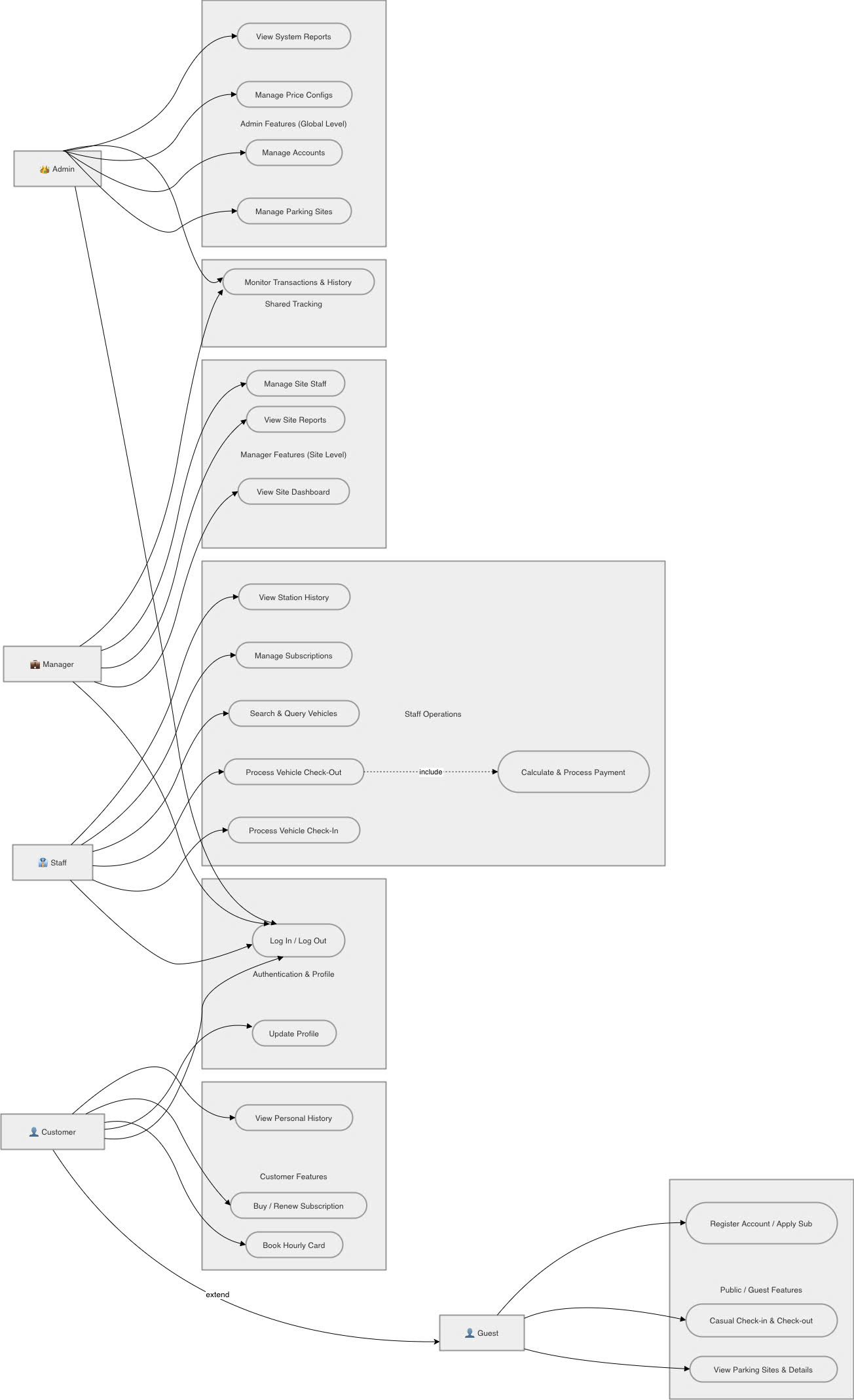
Figure 1. Overall System Use Case Diagram
b. Descriptions
| ID | Feature | Use Case | Use Case Description |
|---|---|---|---|
| 1 | Customer | View Parking Sites | Browse and view a list of available parking locations, including addresses, operating hours, and current status (available slots) without requiring a login. |
| 2 | View Site Details | View comprehensive information about a specific parking site, such as pricing tables (hourly/monthly), and exact location on the map. | |
| 3 | Register / Login | Create a new personal account or authenticate existing credentials to access personalized features and transaction history. | |
| 4 | Booking Hourly Card | Book a short-term parking slot for a specific date and time. Note: The booking duration must be at least 1 hour to be valid. | |
| 5 | Buying Subscription (Monthly Card) | Subscribe to a long-term parking service for a specific vehicle at a chosen site, typically offering better rates for recurring users. | |
| 6 | Update Profile | Manage and edit personal information, including contact details (phone, email) and vehicle information (license plate, vehicle type). | |
| 7 | View history | View all history subscriptions and bookings. | |
| 4 | Staff | Log In / Log Out | Authenticate into the ParkStaff system and end the working shift session. |
| 5 | Process Vehicle Check-In | Scan parking card, input/capture license plate, identify vehicle type (car/motorbike), and create an active parking session. | |
| 6 | Process Vehicle Check-Out | Scan parking card, verify if the output license plate matches the entry plate, and check the subscription status. | |
| 7 | Calculate Fee & Process Payment | Automatically calculate parking fees based on duration and price configurations (hourly, booking, or subscription), display the fee modal, and process the checkout transaction. | |
| 8 | Search and Query Vehicles | Search for specific vehicles currently in the parking site using license plate or card ID, and view their current parking status. | |
| 9 | Manage Subscriptions | Look up registered monthly passes for regular customers, check card validity/expiration dates, and process subscription renewals. | |
| 10 | View Parking History | View logs of recent vehicle entries and exits, and track daily check-in/check-out records handled at the station. | |
| 11 | Manager | Log In / Log Out | Authenticate as manager to access the site-specific management dashboard. |
| 12 | View site dashboard | Monitor real-time statistics, active sessions, and revenue strictly for their assigned parking site. | |
| 13 | View site history | Control subscription and history transactions. | |
| 14 | View site reports | Monitor site system revenue, overall staff statistics, and site generate financial reports. | |
| 15 | View site staff | Control all staffs of their parking site. | |
| 16 | Admin | Log In / Log Out | Authenticate as system administrator to access the full global admin panel. |
| 17 | Mange parking site | Add, edit, or close parking sites, and define their specific parking areas and capacities. | |
| 18 | Manage staff accounts | Add, edit, view, or deactivate (soft delete) Manager, Staff accounts. | |
| 19 | Manage price configs | Set up and update dynamic pricing rules (hourly, monthly) for different vehicle types at each site. | |
| 20 | View system reports | Monitor global system revenue, overall staff statistics, and generate financial reports. | |
| 21 | Manage history | Control subscription and history transactions. | |
| 22 | Guest | View parking sites | Browse and view public information about available parking sites without login. |
| 23 | Casual check-in & check-out | Enter and exit the parking site as a casual user by receiving a parking card and paying the hourly fee without needing an account. | |
| 24 | Register monthly subscription | Apply for a monthly parking pass by providing vehicle details and personal information. |
2. Overall Functionalities
2.1 Screens Flow
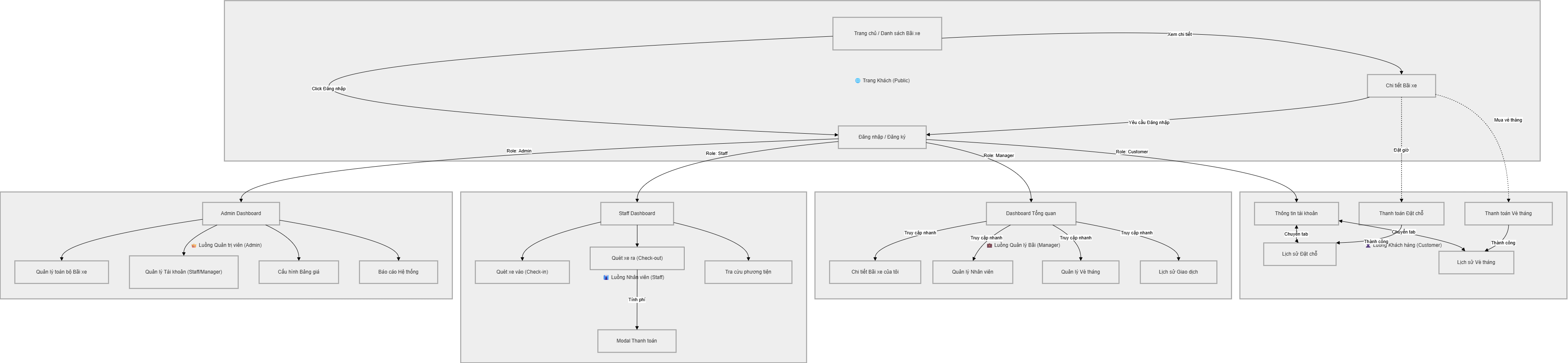
Figure 2. Screen Flow
2.2 Screen Descriptions
| # | Feature | Screen | Description |
|---|---|---|---|
| 1 | Registration | Registration Page | Allows new users (Guests) to create a Customer account to access booking and subscription features. |
| 2 | Login | Login Page | Enables Customers, Staff, Managers, and Admins to authenticate and log in using their credentials. |
| 3 | Home Navigation | Home Page | Displays system introduction, public parking sites, purchase subscription and provides access to Login and Registration. |
| 4 | Search Sites | Booking | Users can search for available parking sites by name, location, or region (North, Middle, South). |
| 5 | View Site Details | Site Details Page | Shows detailed information about a selected parking site, including capacity, vehicle types supported, and pricing. |
| 6 | Profile | View Job Details | Shows detailed information about a selected job and allows applying. |
| 7 | Profile Management | Customer Profile | Customers can update their personal information. |
| 8 | Booking Management | Booking Slot Page | Customers can reserve a parking slot in advance for a specific vehicle type, date, and time. |
| 9 | Subscription Management | Subscription Page | Customers can register, view, or renew monthly/ yearly parking passes (subscriptions) for their vehicles. |
| 10 | History Tracking | Parking & Transaction History (customer proflie) | Customers can view their past parking sessions, bookings, and detailed payment transactions. |
| 11 | Staff Dashboard (Check-in / Check-out) | Staff Dashboard | Manage real-time vehicle entry and exit. Main operational interface featuring dual actions: inputting Card ID/License Plate for Check-in, and processing Check-out with an automated fee estimation modal. Includes the Offcanvas Sidebar for navigation. |
| 12 | Vehicle Searching | Vehicle Searching Page | Query real-time and historical vehicle data. Contains search inputs (by License Plate or Card ID), status filters, and a data table displaying current parking sessions, entry times, and vehicle types. |
| 13 | Staff Subscription Management | Subscription Management Screen | Monitor and renew monthly parking passes. Displays a paginated list of registered subscribers, pass validity state (Active/Expired), vehicle details, and action buttons for pass renewal or registering new monthly tickets. |
| 14 | Parking History Management | Parking History Screen | Track daily transaction logs. Shows a detailed table of completed parking sessions, including check-in/out timestamps, calculated fees, and total parking duration handled during the staff's shift. |
| 15 | Fee Estimation | Payment Modal (Popup) | Display pricing details and confirm checkout. A popup overlay triggered during check-out, displaying extracted data (Time In, Duration, Expected Fee) and a final confirmation button to complete the transaction. |
| 16 | Manager Dashboard | Manager Dashboard | Main interface for managers to view revenue, transactions, and statistics strictly for their assigned parking site. |
| 17 | Admin Dashboard | Admin Dashboard | Main interface for admins to monitor global system revenue, overall user statistics, and overall operations. |
| 18 | Manage Staff | Manage Staff | Admins can add, edit, or deactivate (soft delete) Admin, Manager, Staff accounts, searching staff by id, name, role and site that they signed. |
| 19 | Manage Sites & Areas | Manage Parking Sites | Admins can create new parking sites, configure specific parking areas, and define slot capacities, create the amount of cards, also find any site by searching bar. |
| 20 | Manage Pricing | Update ParkingSites | Admins can set up and dynamically update base prices (hourly, monthly) for different vehicle types. |
| 21 | Global Reports | System Reports | Admins and Manager can generate and review overall financial reports and payment transactions across all sites or only one site that choosen by admin. |
| 22 | Logout | Logout | Allows users to securely exit the system and end their session. |
2.3 Screen Authorization
| # | Screen | Admin | Manager | Staff | Customer |
|---|---|---|---|---|---|
| 1 | Home & Search Sites | x | |||
| 2 | Registration | x | |||
| 3 | Login | x | x | x | x |
| 4 | Customer Profile | x | |||
| 5 | Bookings & Subscriptions | x | |||
| 6 | Parking & Transaction History | x | |||
| 7 | Staff Dashboard (Check-in / Check-out) | x | |||
| 8 | Vehicle Searching | x | |||
| Staff Subscription Management | x | ||||
| Parking History Management | x | ||||
| Fee Estimation | x | ||||
| 9 | Manager Dashboard & Site Reports | x | |||
| 10 | Manager Site | x | |||
| 11 | Manager Staff | x | |||
| 12 | Manager Transaction & Subscription | x | |||
| 13 | Admin Dashboard & Global Reports | x | |||
| 14 | Admin Site | x | |||
| 15 | Admin Staff | x | |||
| 16 | Admin Transaction & Subscription | x | |||
| 17 | Logout | x | x | x | x |
3. System High Level Design
3.1 Database Schema
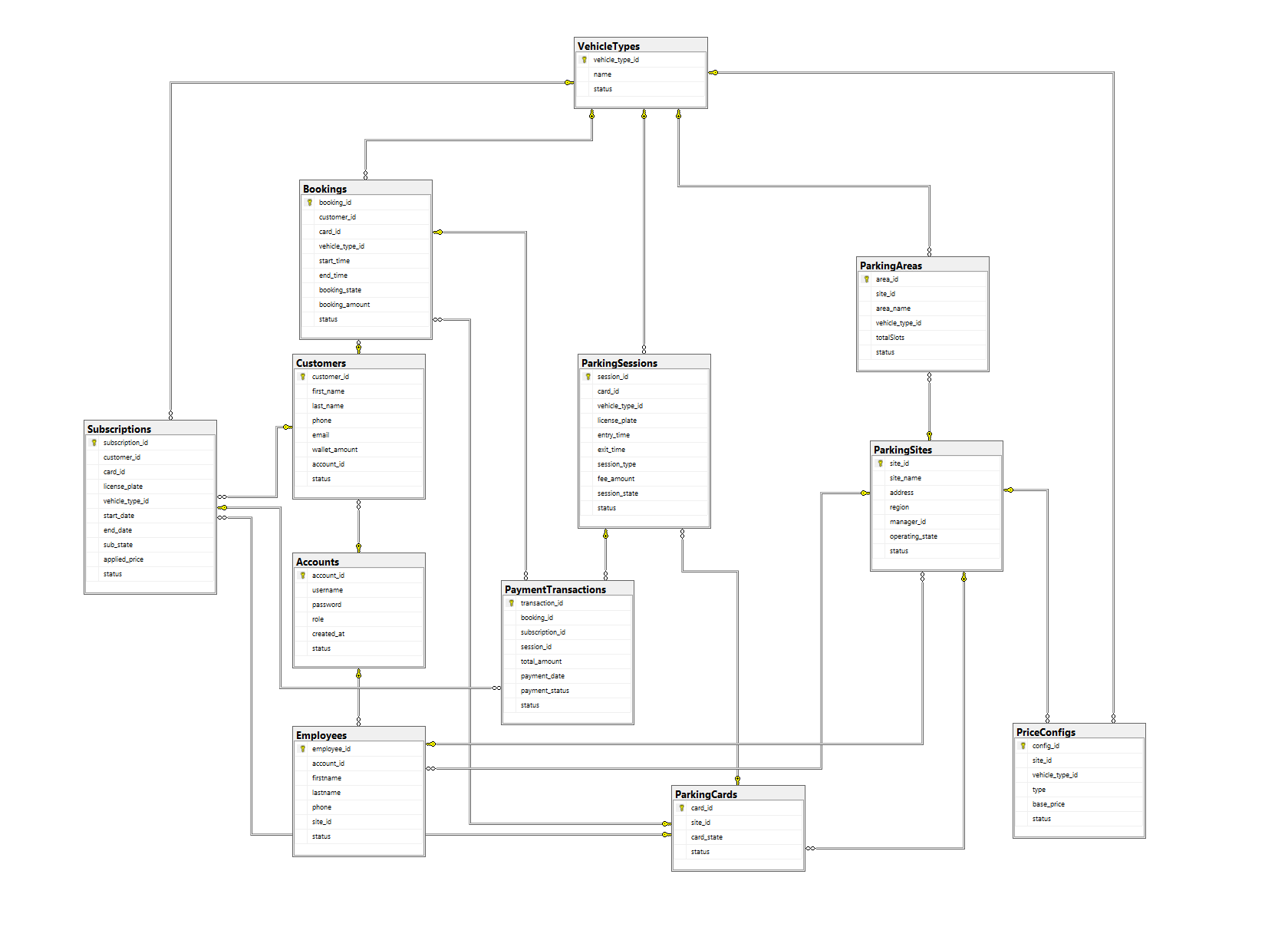
Figure 3. Database Schema Diagram
3.2 Table Descriptions
| No | Table | Description |
|---|---|---|
| 1 | Accounts | Stores user login credentials, access roles (admin, staff, customer), and account status. |
| 2 | Vehicle Types | Manages supported vehicle categories (e.g., "car", "motorbike"). |
| 3 | Parking Sites | Stores information about physical parking facilities (Name, Address, Region, Operational State...). |
| 4 | Employees | Stores personal and contact information of staff and managers assigned to specific parking sites. |
| 5 | Customers | Stores profiles of users utilizing the parking services (Name, Phone, Email, Wallet Balance...). |
| 6 | Parking Areas | Manages specific parking zones within a site, defining vehicle type restrictions and slot capacity. |
| 7 | Parking Cards | Manages physical RFID cards used for vehicle identification during check-in and check-out. |
| 8 | Price Configs | Stores dynamic pricing rules and base rates based on site, vehicle type, and billing cycle. |
| 9 | Subscriptions | Manages long-term parking passes (monthly/yearly), including assigned vehicles and valid date ranges. |
| 10 | Parking Sessions | Records real-time vehicle entry and exit events, calculating actual parking duration and incurred fees. |
| 11 | Bookings | Stores advance parking reservations made by customers, including expected arrival/departure times. |
| 12 | Payment Transactions | Logs all financial records and collected revenues from parking sessions, bookings, and subscriptions. |
II. Web Application
This section provides detailed descriptions of the user interfaces and corresponding data fields for each system screen.
2.1. Customer
2.1.1. Customer logs in with their account
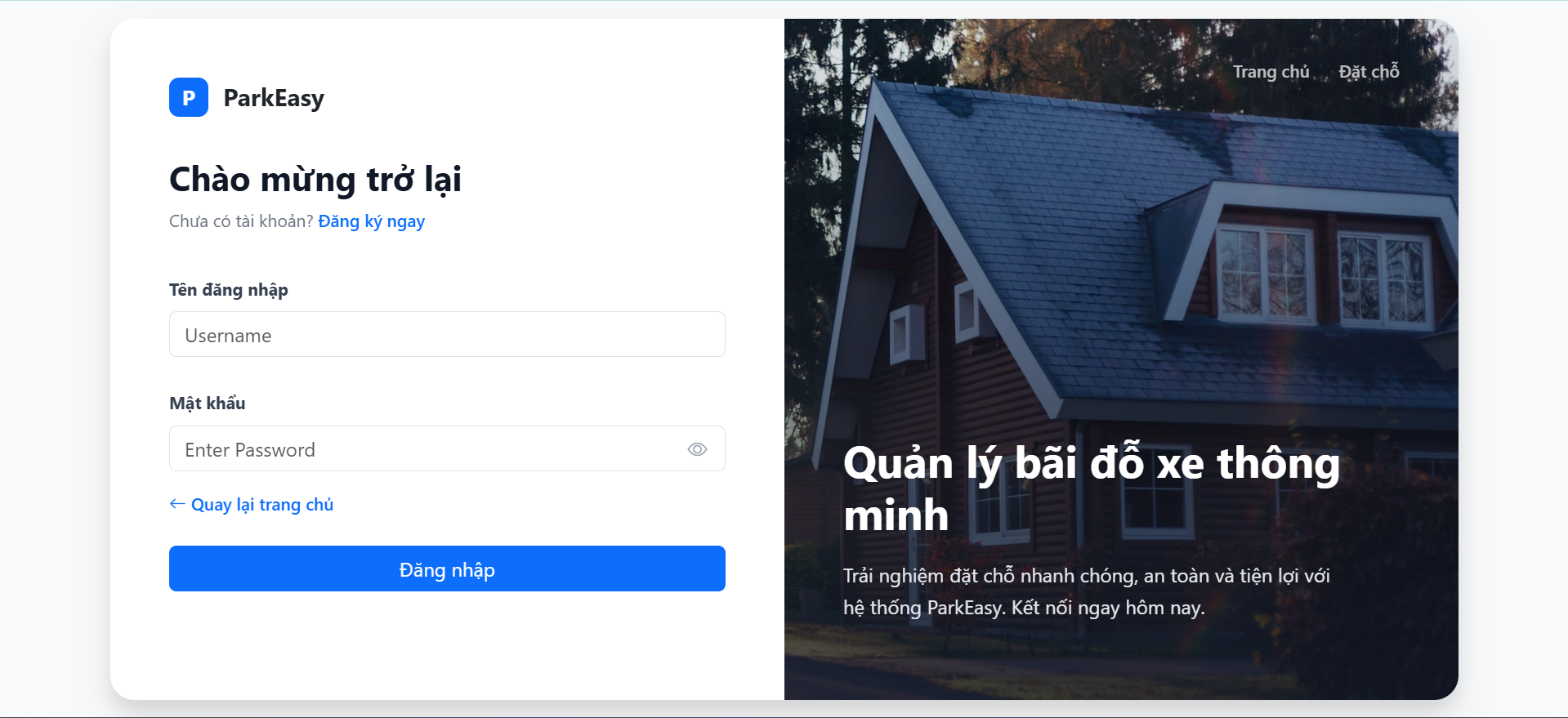
Figure 4. Customer Login interface
| Field Name | Field Type | Description |
|---|---|---|
| User name | Text Box | This is for customer to input user name for logging in |
| Password | Password Box | This is for customer to input password for logging in |
| Login | Button | Customer clicks to authenticate themselves into the system with provided email/user name & password |
2.1.2. Customer after logging in
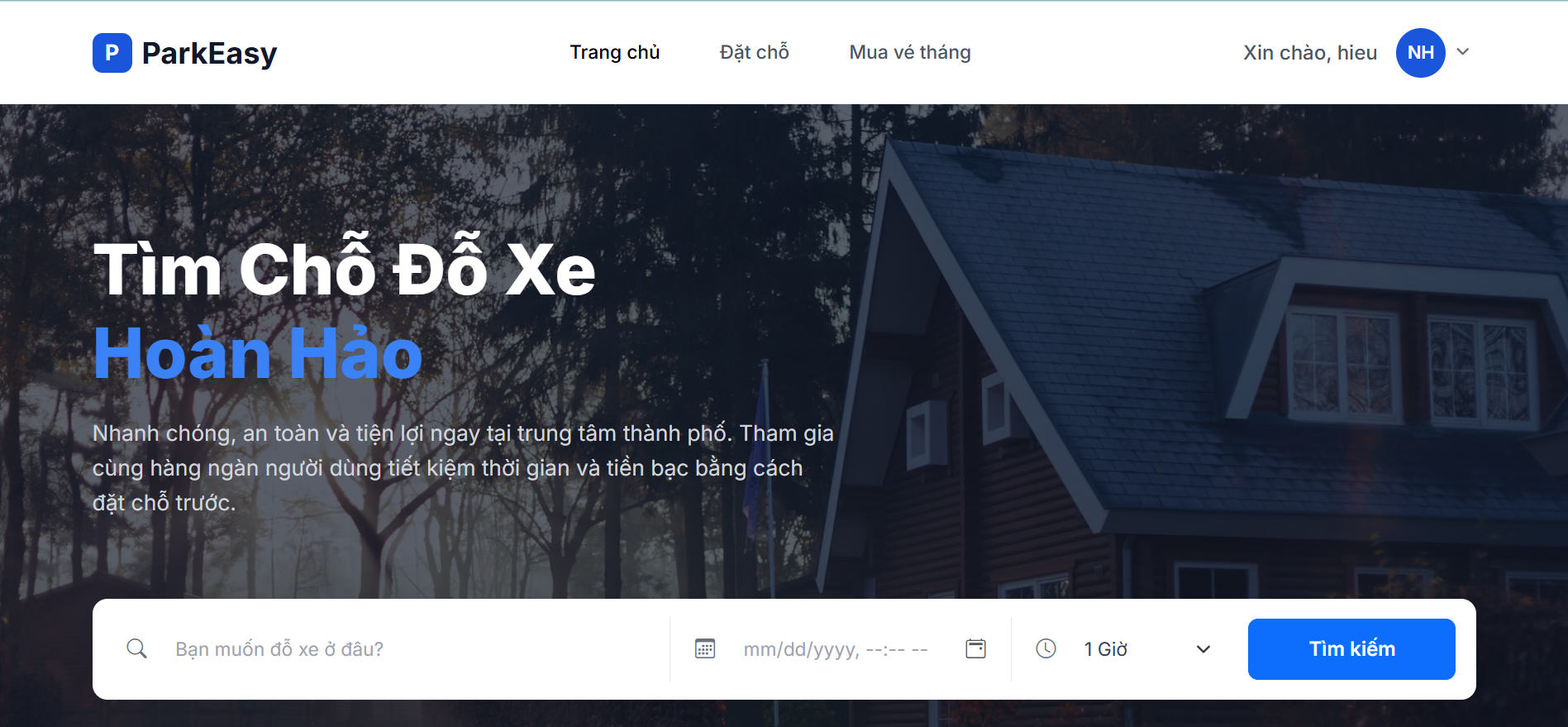
Figure 5. Customer Homepage after Login
| Field Name | Field Type | Description |
|---|---|---|
| ParkEasy/logo | Logo/Link | Display the site logo, name and navigates to the homepage when clicked |
| Home Page | Navigation Link | Navigates to the homepage |
| Booking | Navigation Link | Navigates to the parking's sites page for booking |
| Buying | Navigation Link | Navigates to the parking's sites page for buying |
| Avatar icon | User Profile/Link | Displays the logged-in customer's username and opens a dropdown menu for profile/logout. Navigate to customer's profile when clicked |
2.1.3. Customer Profile
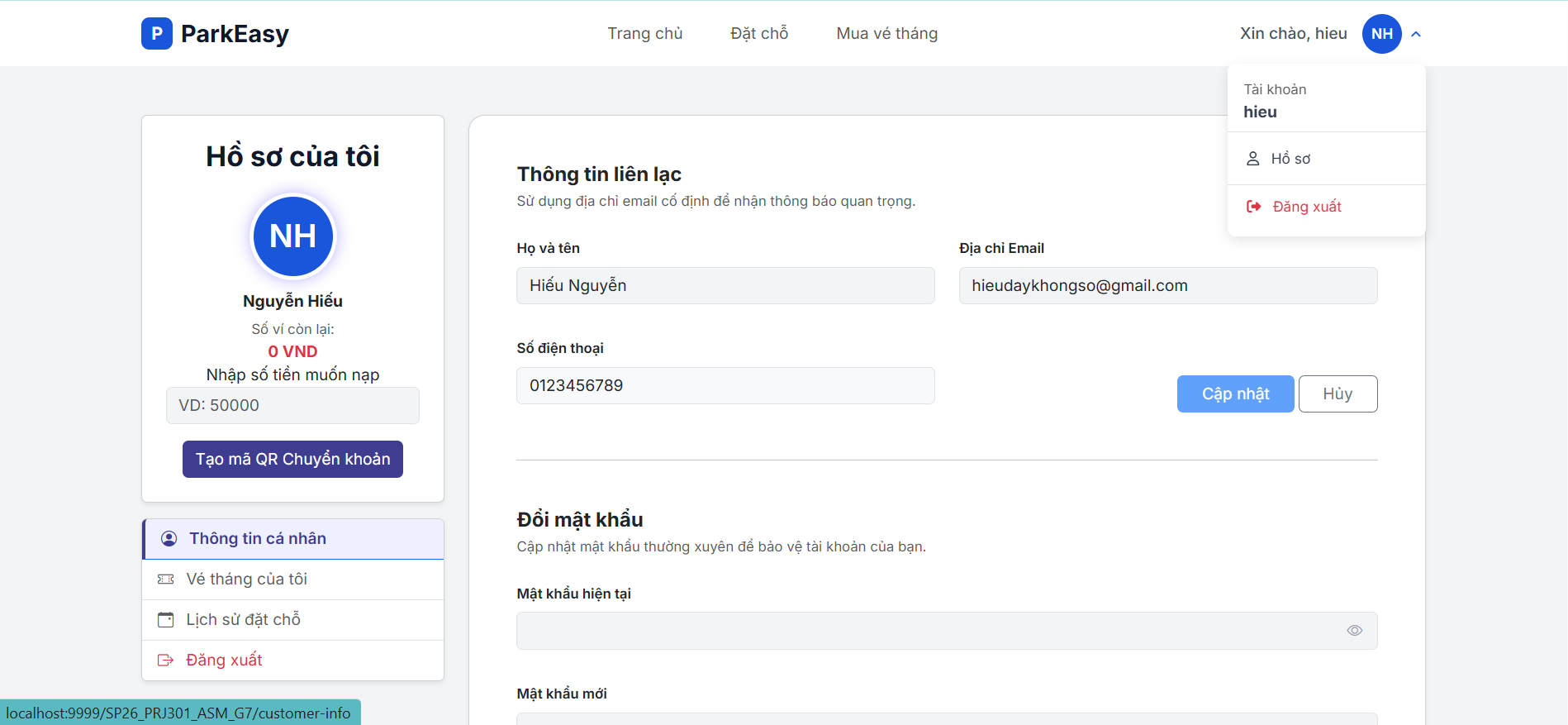
Figure 6. Customer Profile Update interface
| Field Name | Field Type | Description |
|---|---|---|
| firstname | String | Customer's firstname |
| lastname | String | Customer's lastname |
| String | Customer's email | |
| phone | String | Customer's phone |
| errorName | String | Error message displayed if name validation fails |
| errorPhone | String | Error message displayed if phone validation fails |
| erroOldPass | String | Error message displayed if the old password entered is incorrect |
| errorNewPass | String | Error message displayed if the confirm password does not meet security requirements and not duplicate with the old password |
2.1.4. History Subscriptions
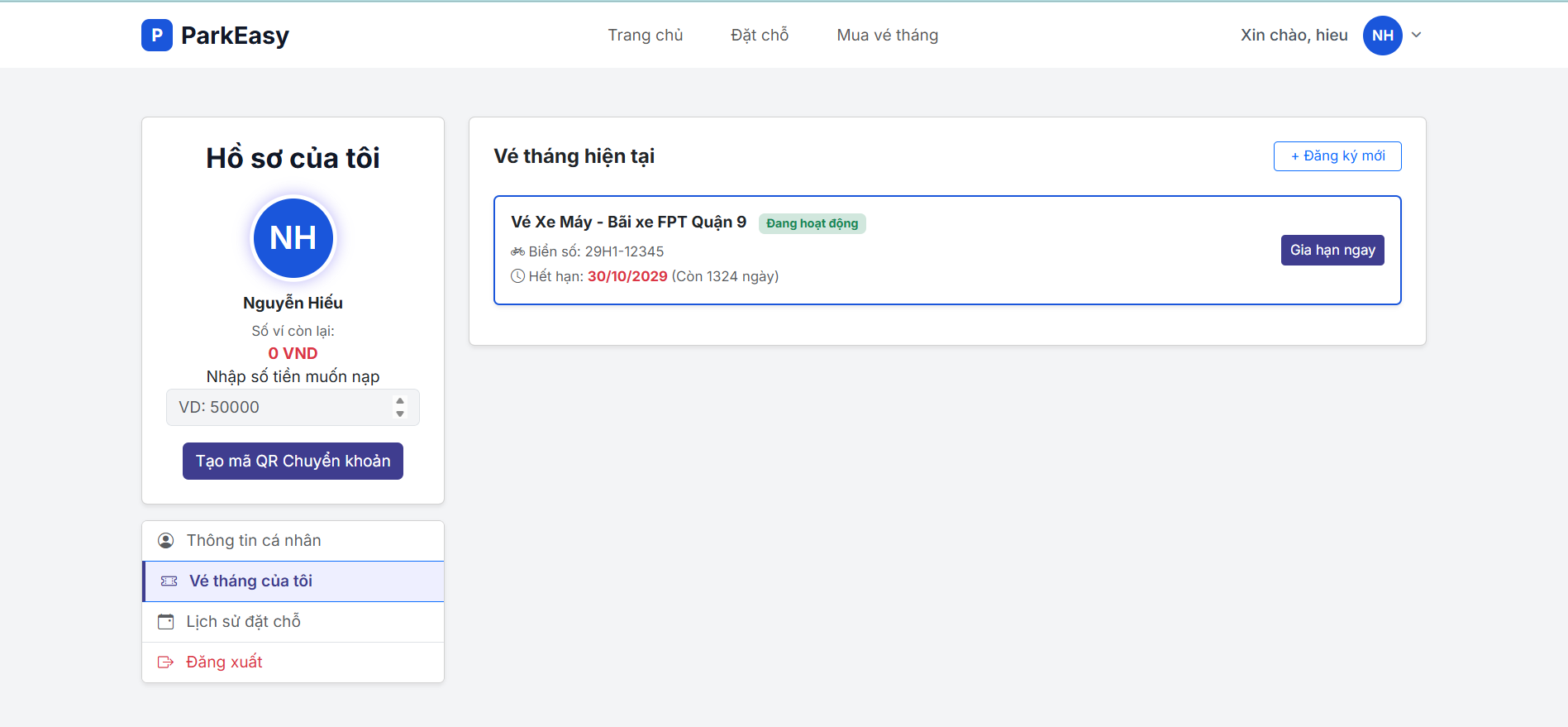
Figure 7. Vehicle and Parking Session interface
| Field Name | Field Type | Description |
|---|---|---|
| subscriptions | List | Collection of the customer's subscription records. |
| subState | Enum/String | The current state of the subscription ('active' or 'expired'). |
| vehicleTypeId | Integer | ID representing the vehicle category (e.g., 1 for Car, 2 for Motorbike). |
| actionType | String | Hidden field defining the form operation: 'checkin' or 'checkout'. |
| siteId | Integer | The unique identifier of the parking site. |
| siteName | String | The name of the parking site for the subscription. |
| licensePlate | String | The license plate number registered for the subscription. |
| endDate | Date | The expiration date of the current subscription. |
| dayRemain | Integer | The number of days remaining until the subscription expires. |
| basePrice | Long | The base price for 1 month, used dynamically in JS to calculate renewal plans. |
2.1.4. History Bookings
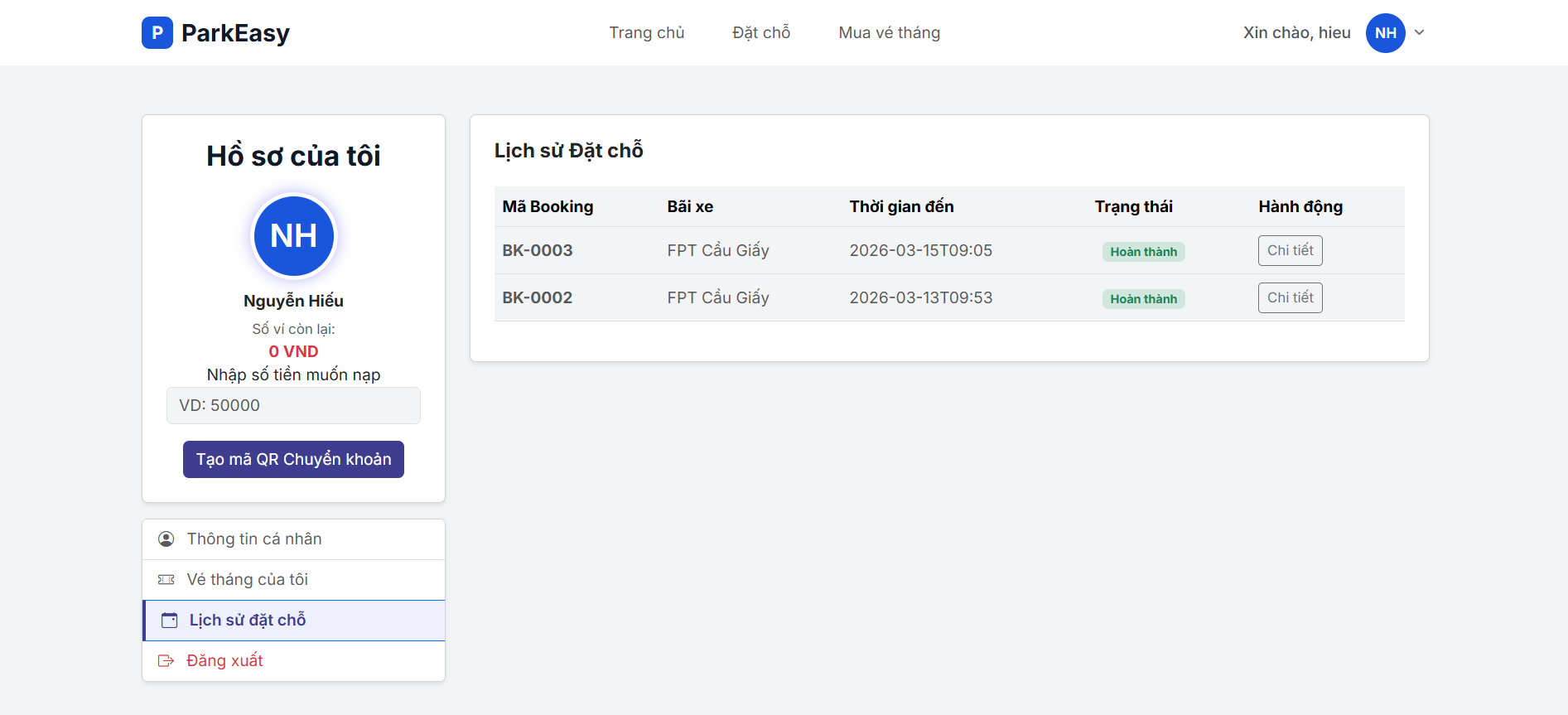
Figure 8. Vehicle and Booking interface
| Field Name | Field Type | Description |
|---|---|---|
| bookings | List | Collection of the customer's bookings records. |
| bookingId | Integer | The unique identifier for the booking transaction. |
| siteName | String | The name of the parking site where the booking was made. |
| timeIn | Date/Timestamp | The expected arrival time of the vehicle |
| bookingAmount | Long | The total amount paid or to be paid for the booking. |
| state | String | The current status of the booking (e.g., 'upcoming', 'completed'). |
2.1.5.Booking Hourly Card
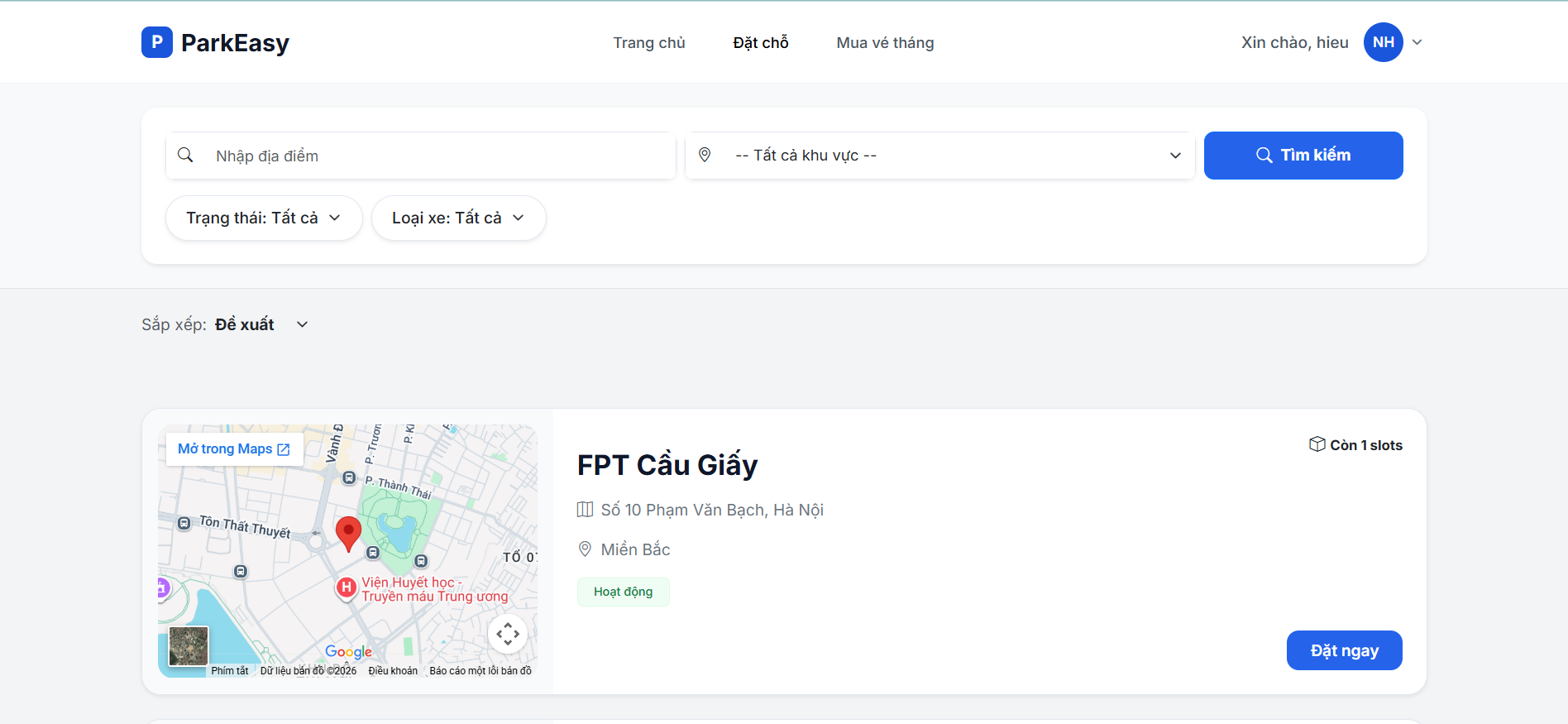
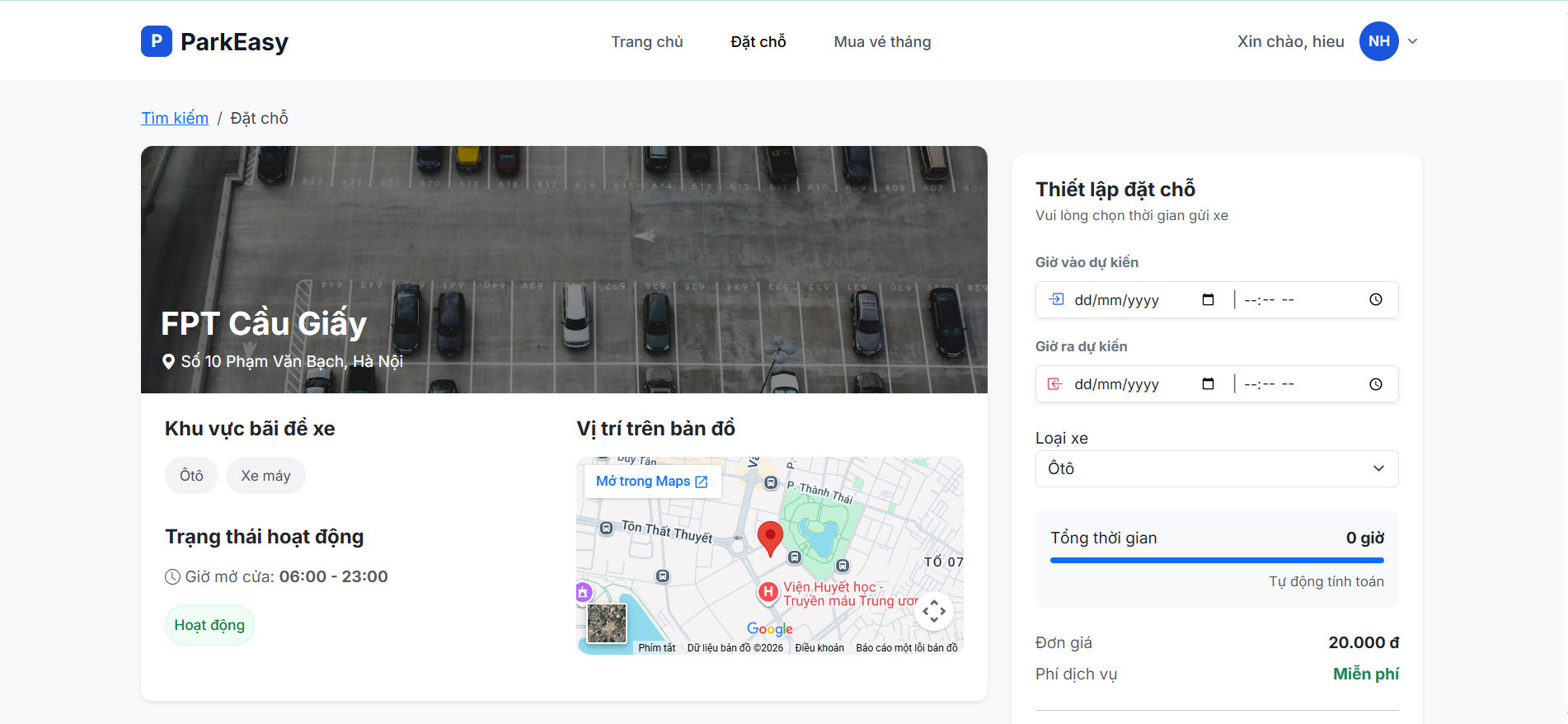
Booking
| Field Name | Field Type | Description |
|---|---|---|
| siteName | String | The name of the parking facility displayed in the hero section. |
| address | String | The physical address of the site (also used for Google Maps embedding). |
| vehicles | List | A list of vehicle objects supported by the site (e.g., Car, Motorbike). |
| siteState | Enum/String | Current operational status (e.g., OPERATING, MAINTENANCE). |
| dateError | String | Server-side validation message displayed if date selection is invalid. |
| dateIn | Date | The scheduled arrival date (Format: yyyy-MM-dd). |
| timeIn | Time | The scheduled arrival time (Format: HH:mm). |
| dateOut | Date | The scheduled departure date. |
| timeOut | Time | The scheduled departure time. |
| typeVehicle | Intger | The unique identifier (vehicleTypeId) of the selected vehicle category. |
| hour | Intger | The calculated total duration in hours (computed via JavaScript). |
| price | Intger | The base hourly rate for the selected vehicle type. |
| totalPrice | Intger | The final calculated cost (hour × price). |
2.1.6.Buying Mothly Card (Subscriptions)
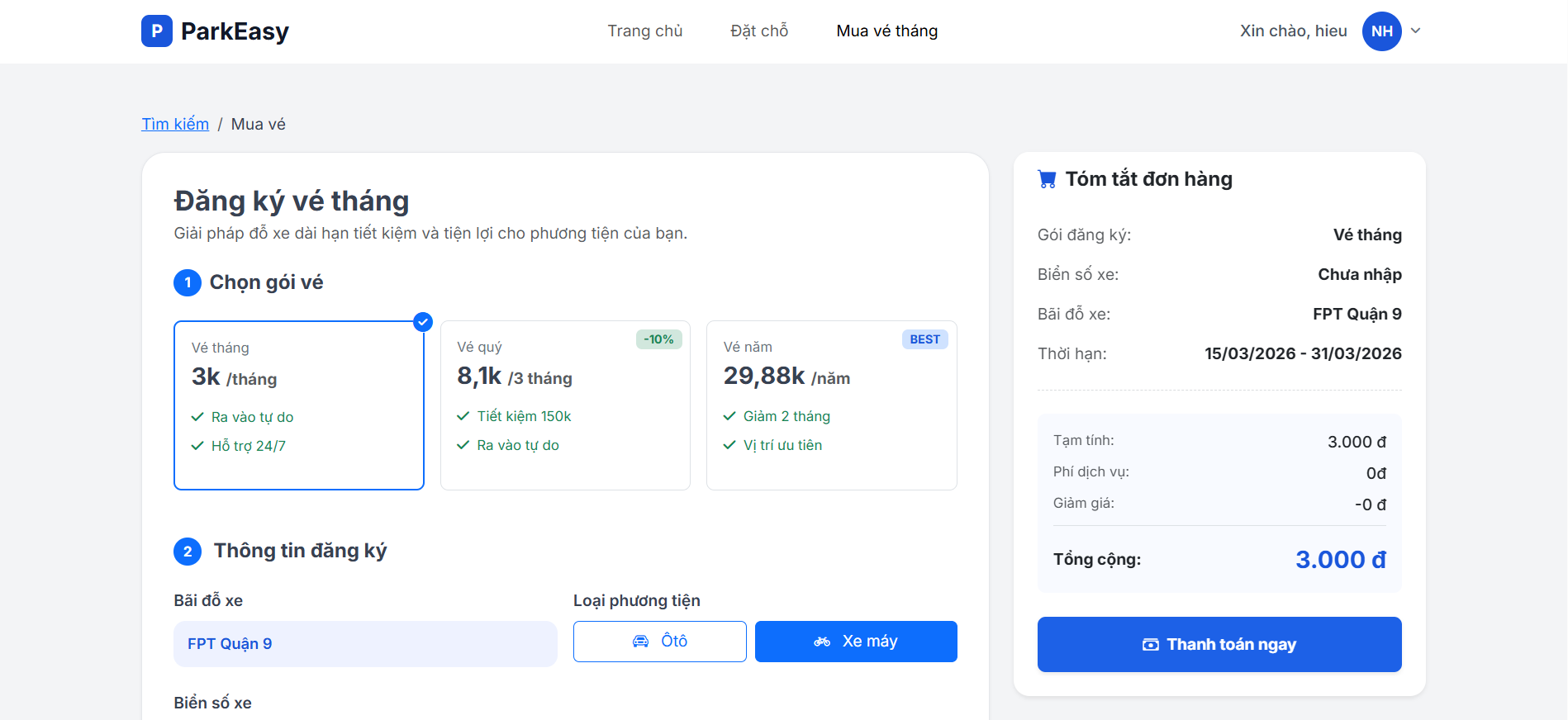
Buying
| Field Name | Field Type | Description |
|---|---|---|
| siteName | String | The name of the parking facility displayed in the header and order summary. |
| address | String | The physical location of the site, used for the address label and the Google Maps iframe query. |
| vehicles | List | A list of vehicle objects supported by the site (e.g., Car, Motorbike). |
| siteId | Integer | The unique identifier of the site, used as a hidden parameter for the payment API. |
| planType | Radio (String) | The subscription duration: month (1 month), quarter (3 months), or year (12 months). |
| licensePlate | String | The vehicle's registration plate number, validated via Regex before submission. |
| price-month/quarter/year | Long | Display labels showing the calculated price per period (K VND) after applying discounts. |
| summary-expiry | Date | The calculated validity range (e.g., 17/03/2026 - 31/03/2026) based on the chosen plan. |
| summary-subtotal | Long | The raw total cost before any discounts are applied (BasePrice x Months) |
| summary-total | Long | The final amount to be paid after applying the discount rate (10% for Quarter, 17% for Year). |
2.2. Staff
2.2.1. Staff Dashboard (Vehicle Check-in / Check-out)
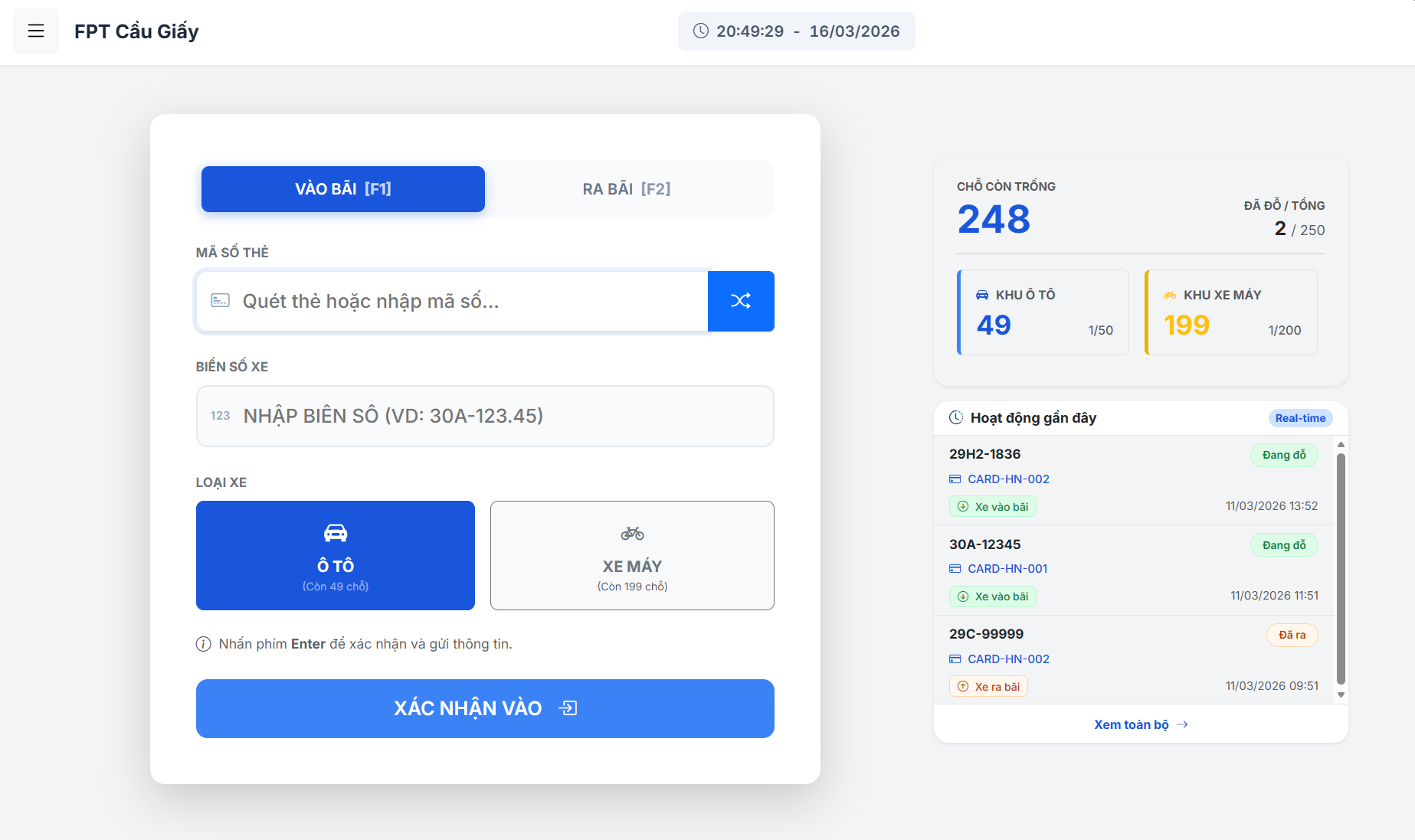
Figure 9. Check-in / Check-out Management interface
| Field Name | Field Type | Description |
|---|---|---|
| cardId | String | Unique identifier scanned from the physical RFID parking card. |
| licensePlate | String | Alphanumeric license plate of the vehicle (requires validation). |
| vehicleTypeId | Integer | ID representing the vehicle category (e.g., 1 for Car, 2 for Motorbike). |
| actionType | String | Hidden field defining the form operation: 'checkin' or 'checkout'. |
| estimatedFeeInput | Long | Hidden field storing the pre-calculated parking fee returned by the API. |
| timeIn | Timestamp | Display-only field showing the exact time the vehicle entered the site. |
| duration | String | Display-only field showing the total elapsed parking time. |
2.2.2. Vehicle Query / Search
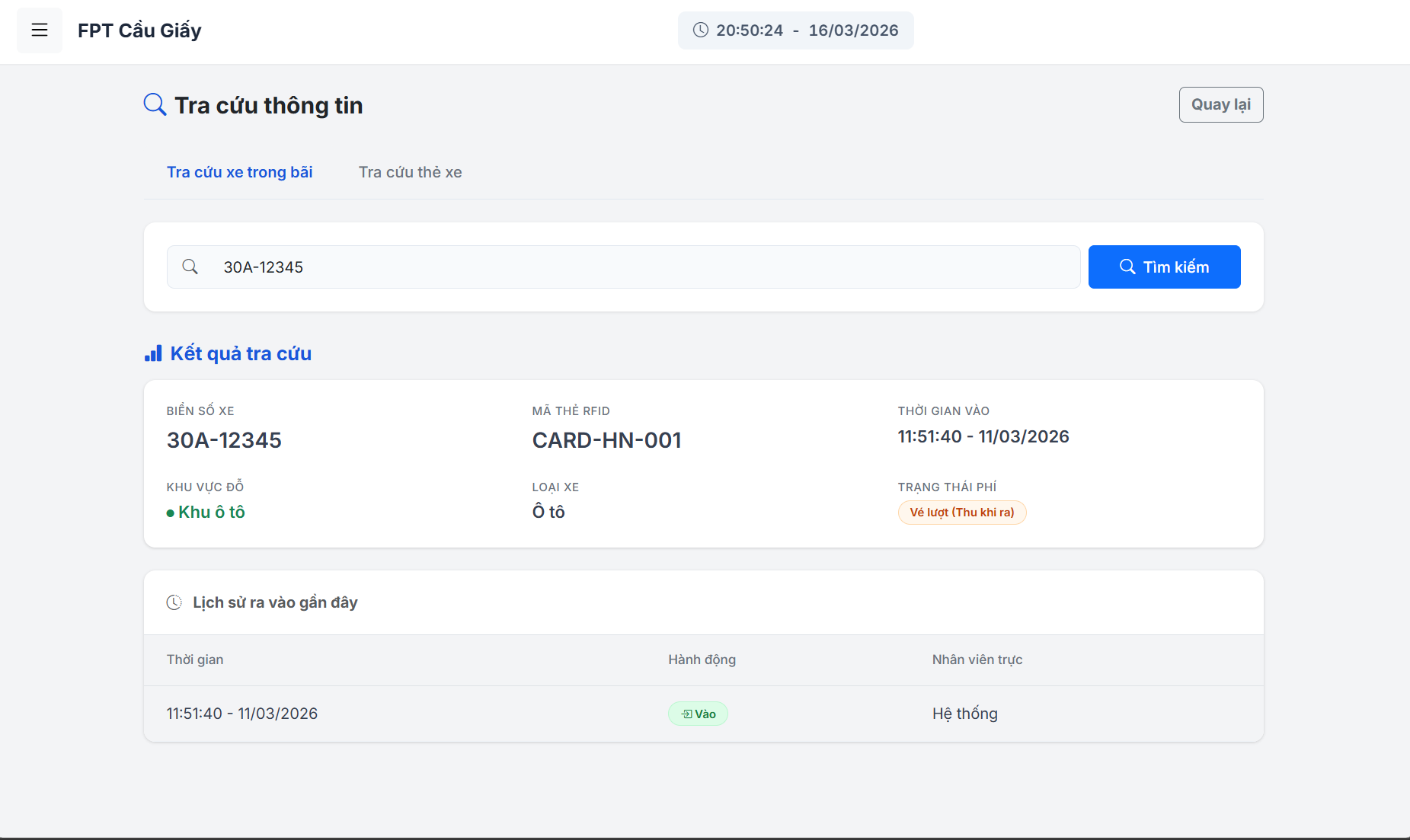
Figure 10.1. Vehicle Lookup and Search interface
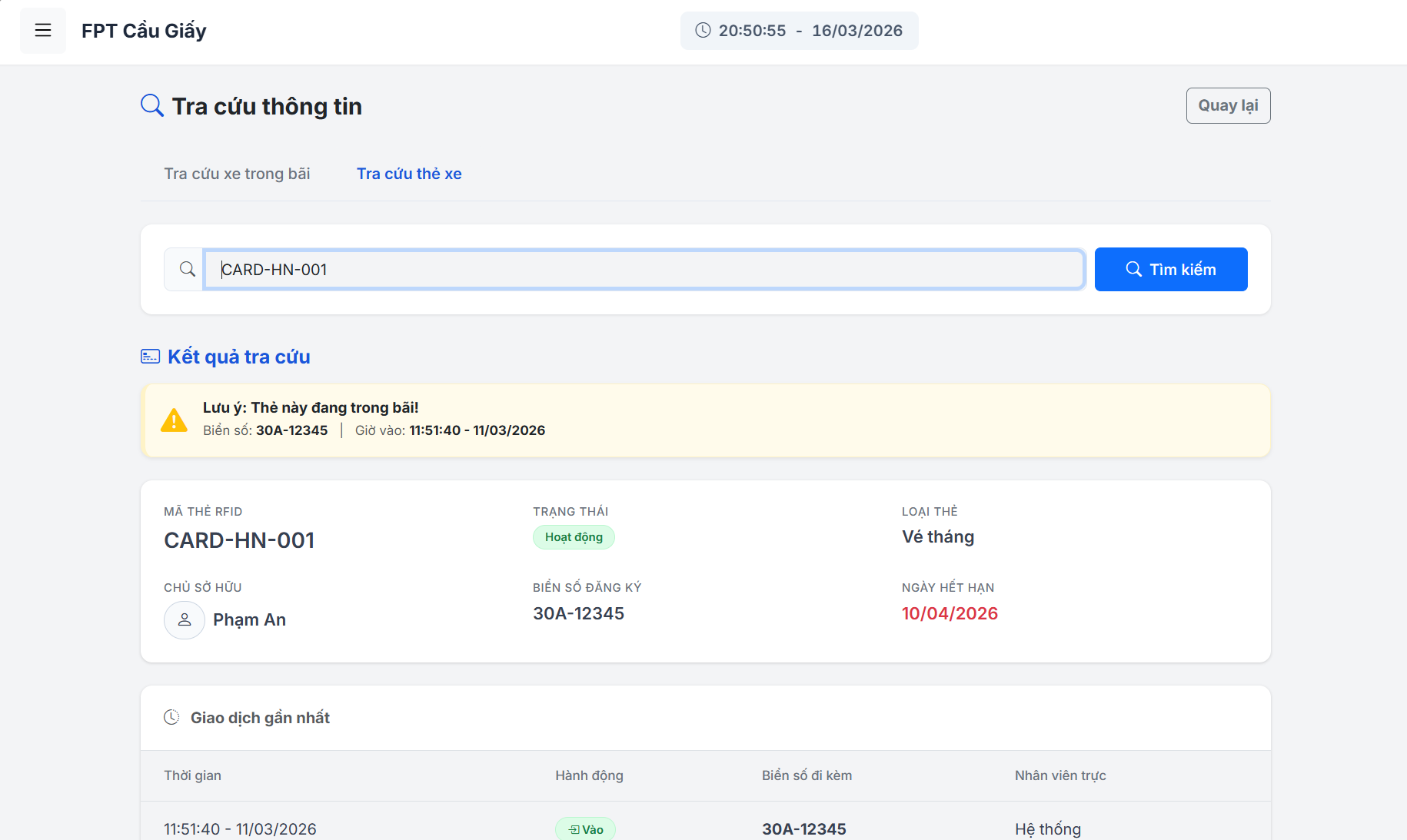
Figure 10.2. Vehicle Lookup and Search interface
| Field Name | Field Type | Description |
|---|---|---|
| searchQuery | String | Text input for searching by either license plate or parking card ID. |
| statusFilter | String | Dropdown to filter parking sessions by status ('Active' or 'Completed'). |
| fromDate | Date | Optional start date input for filtering parking records within a timeframe. |
| toDate | Date | Optional end date input for filtering parking records. |
2.2.3. Subscription Management
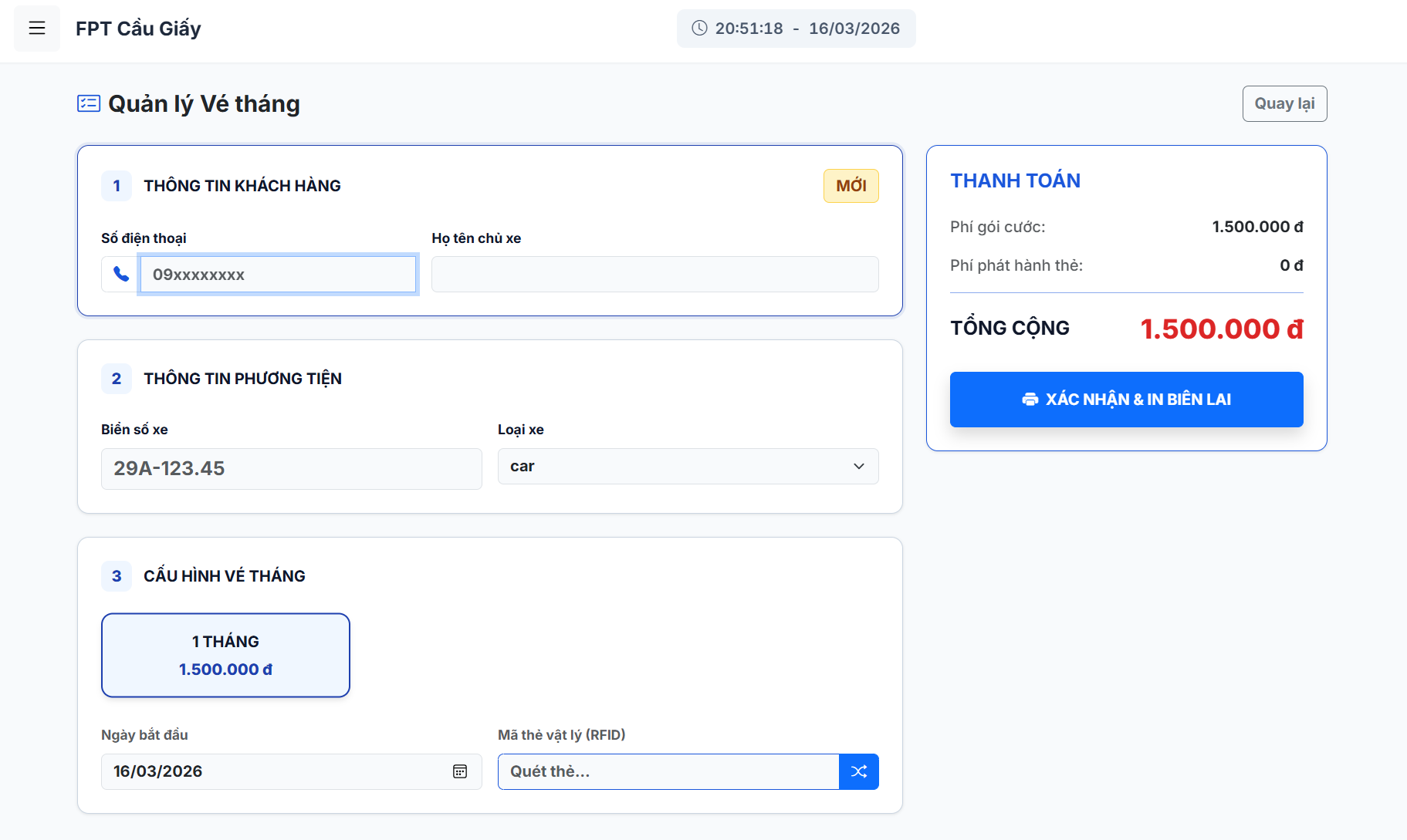
Figure 11. Monthly Subscription Management interface
| Field Name | Field Type | Description |
|---|---|---|
| phoneInput | String | Customer's 10-digit phone number used for lookup via AJAX API. |
| customerName | String | Full name of the subscription holder (auto-filled if existing customer). |
| licensePlate | String | The specific license plate bound to this monthly/quarterly subscription. |
| vehicleTypeId | Integer | Category ID of the registered vehicle. |
| subType | String | Subscription package selected by the customer (e.g., '1-month', '3-months'). |
| startDate | Date | The activation date of the parking pass. |
| endDate | Date | The calculated expiration date of the pass (display only). |
| sumCardPrice | Long | Total price of the selected subscription package to be collected. |
2.2.4. Local Parking History
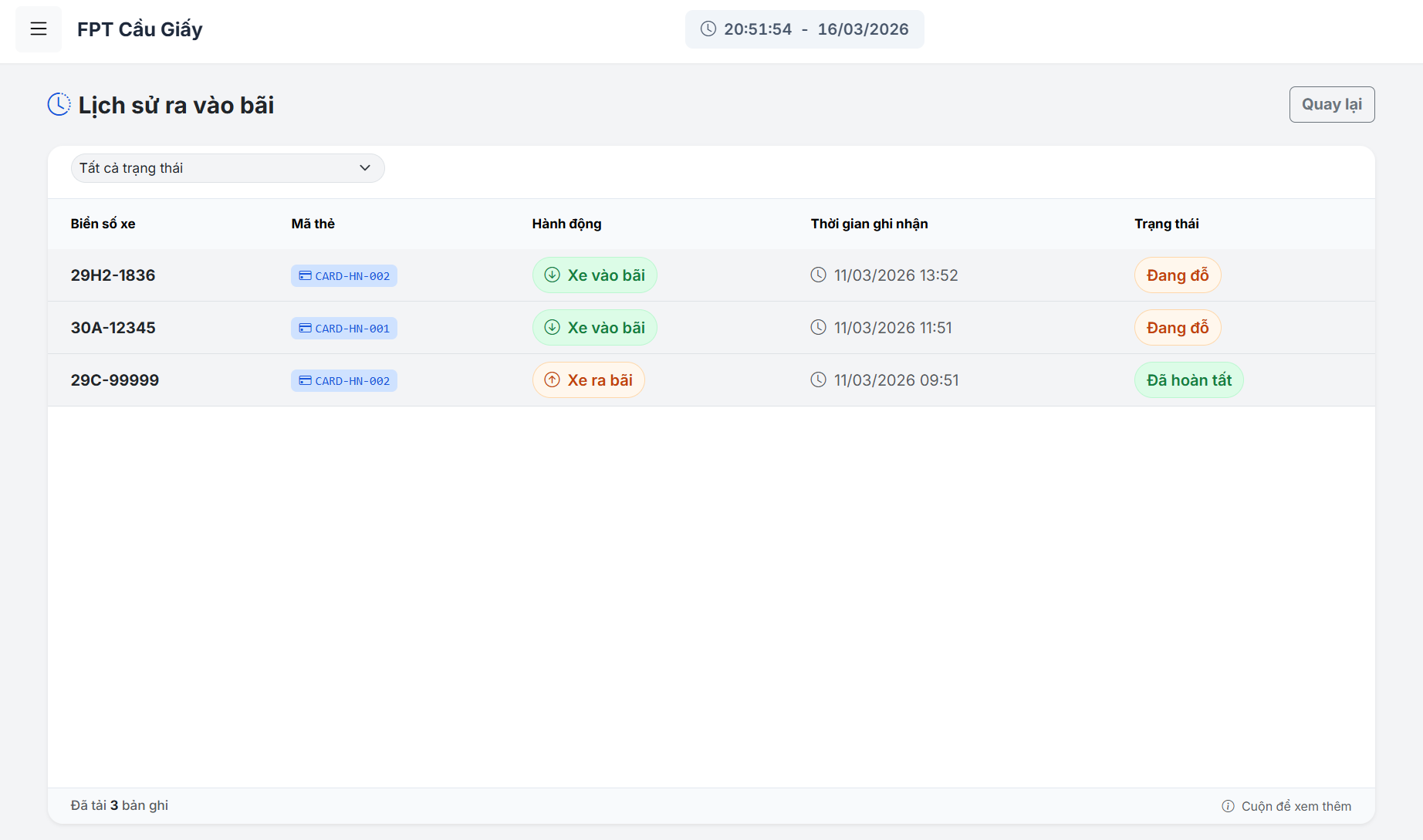
Figure 12. Parking Transaction History interface
| Field Name | Field Type | Description |
|---|---|---|
| dateFilter | Date | Date picker to filter transaction logs by a specific working day. |
| transactionId | String | Unique reference number for the completed payment transaction. |
| checkInTime | Timestamp | Recorded entry time of the parked vehicle. |
| checkOutTime | Timestamp | Recorded exit time when the fee was collected. |
| collectedFee | Long | The final amount of money paid by the customer for the session. |
2.3. Manager
2.3.1. Manager Dashboard
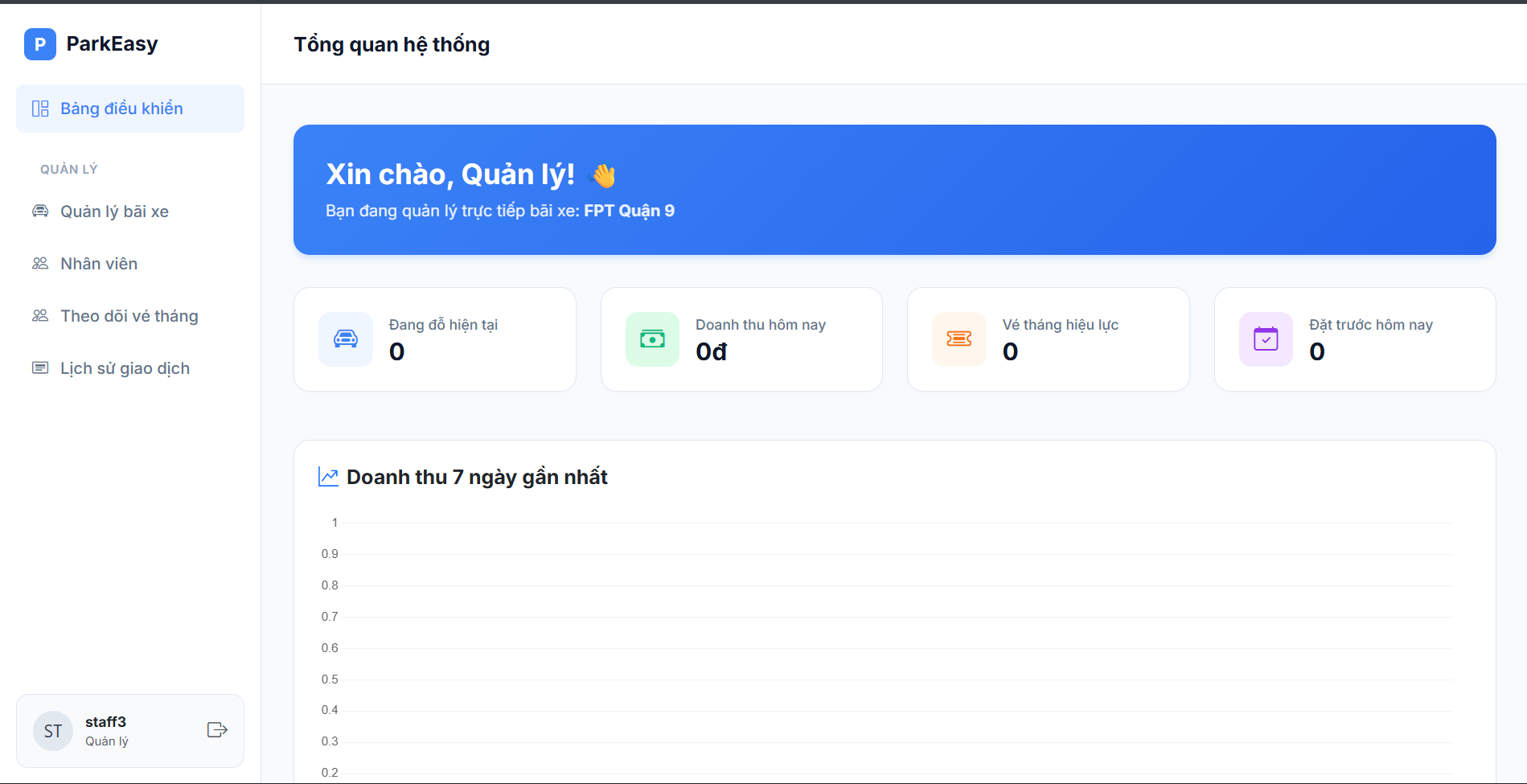
Figure 13. Manager Dashboard interface
| Field Name | Field Type | Description |
|---|---|---|
| errorMessage | String | Displays system error messages if any occur. |
| managerName | String | The name of the currently logged-in manager. |
| mySite | Object | The parking site entity assigned to this manager. |
| mySite.siteName | String | The name of the assigned parking site. |
| totalParked | Integer | Total number of vehicles currently parked at the site. |
| todayRevenue | Long | Total parking revenue generated today. |
| activeSubs | Integer | Total number of active monthly subscriptions. |
| todayBookings | Integer | Total number of reservations/bookings for today. |
| chartLabels | JSON Array (String) | X-axis labels (e.g., dates) for the 7-day revenue chart. |
| chartData | JSON Array (Numeric) | Y-axis values (revenue amounts) for the 7-day revenue chart. |
2.3.2. Site Detail
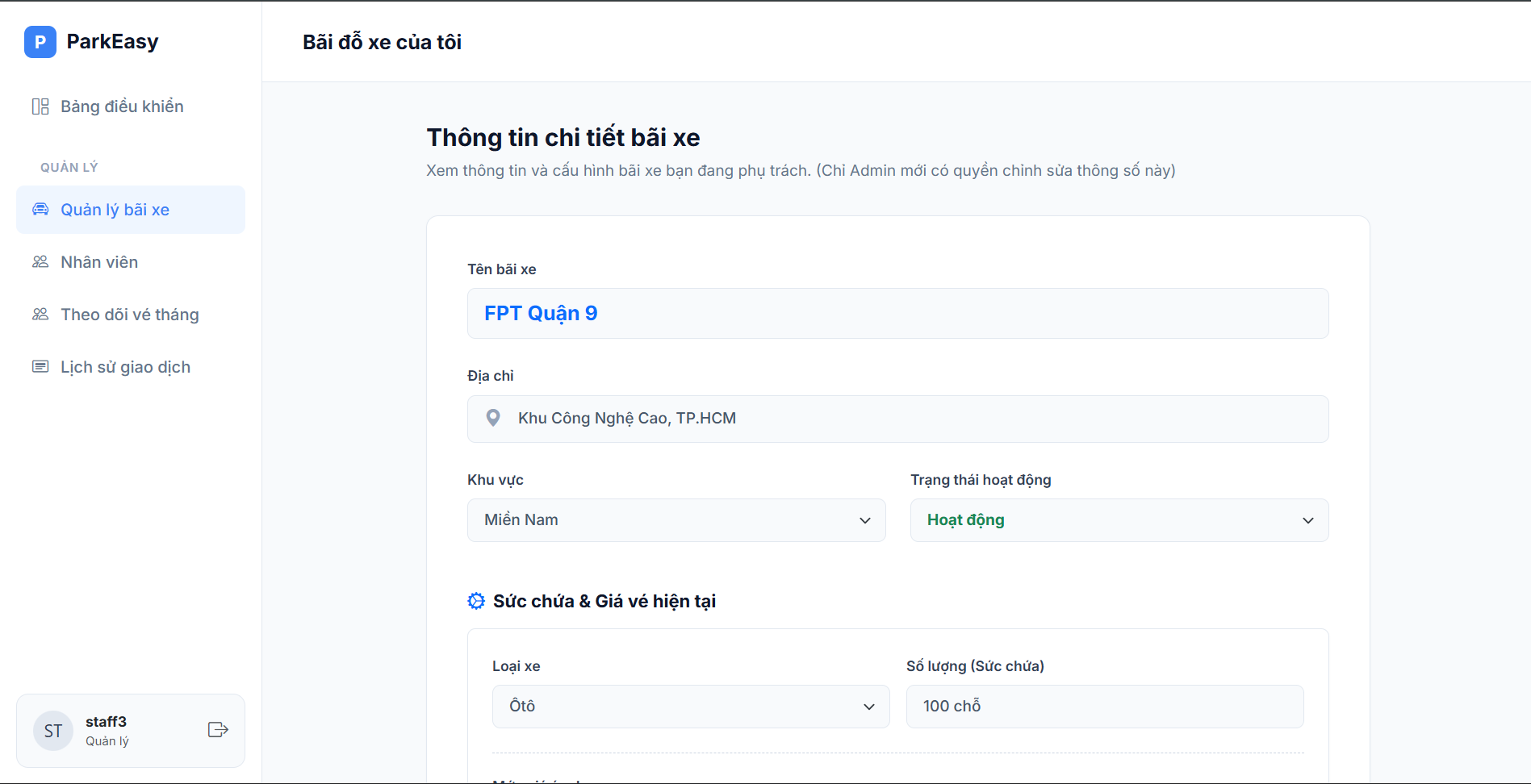
Figure 14.1 Site Detail interface
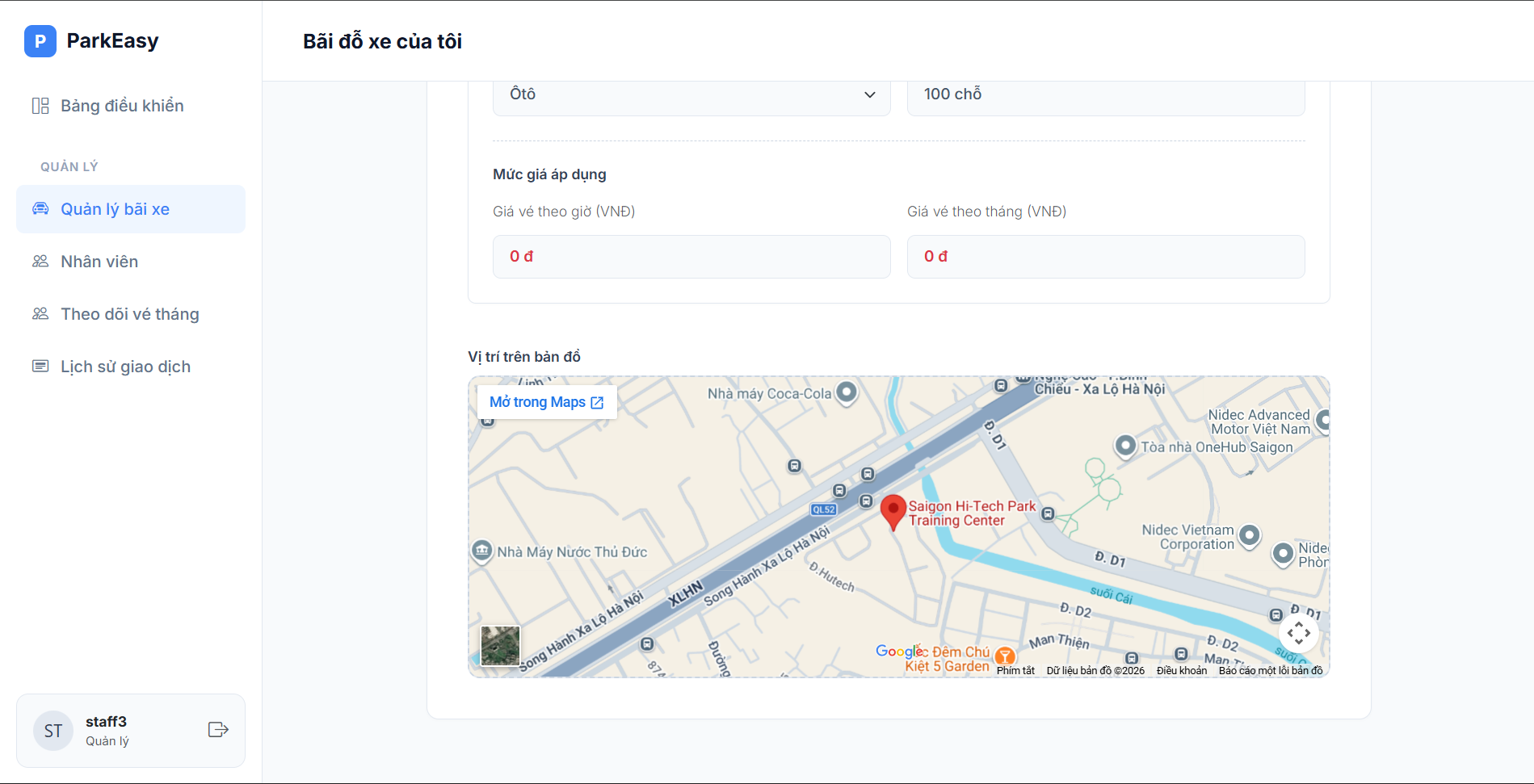
Figure 14.2 Site Detail interface
| Field Name | Field Type | Description |
|---|---|---|
| parkingSite.siteName | String | The name of the parking site. |
| parkingSite.address | String | The physical address of the parking site. |
| parkingSite.region | Enum / String | The region or district where the site is located. |
| parkingSite.siteState | Enum / String | The current operational state of the site (e.g., Active). |
| formData.regions | List<Enum> | List of all available regions for mapping the display label. |
| formData.states | List<Enum> | List of all available site states for mapping the display label. |
| formData.vehicles | List<Object> | Master list of all vehicle types. |
| vehicleConfigDTOs | List<Object> | List of configurations (capacity, price) specific to the site. |
| config.vehicleTypeId | Integer / String | Identifier matching the specific vehicle type. |
| config.capacity | Integer | Maximum parking capacity for the specific vehicle type. |
| config.hourlyPrice | Long | Price per hour for parking this vehicle type. |
| config.monthlyPrice | Long | Price per month for subscribing this vehicle type. |
2.3.3. List Employee
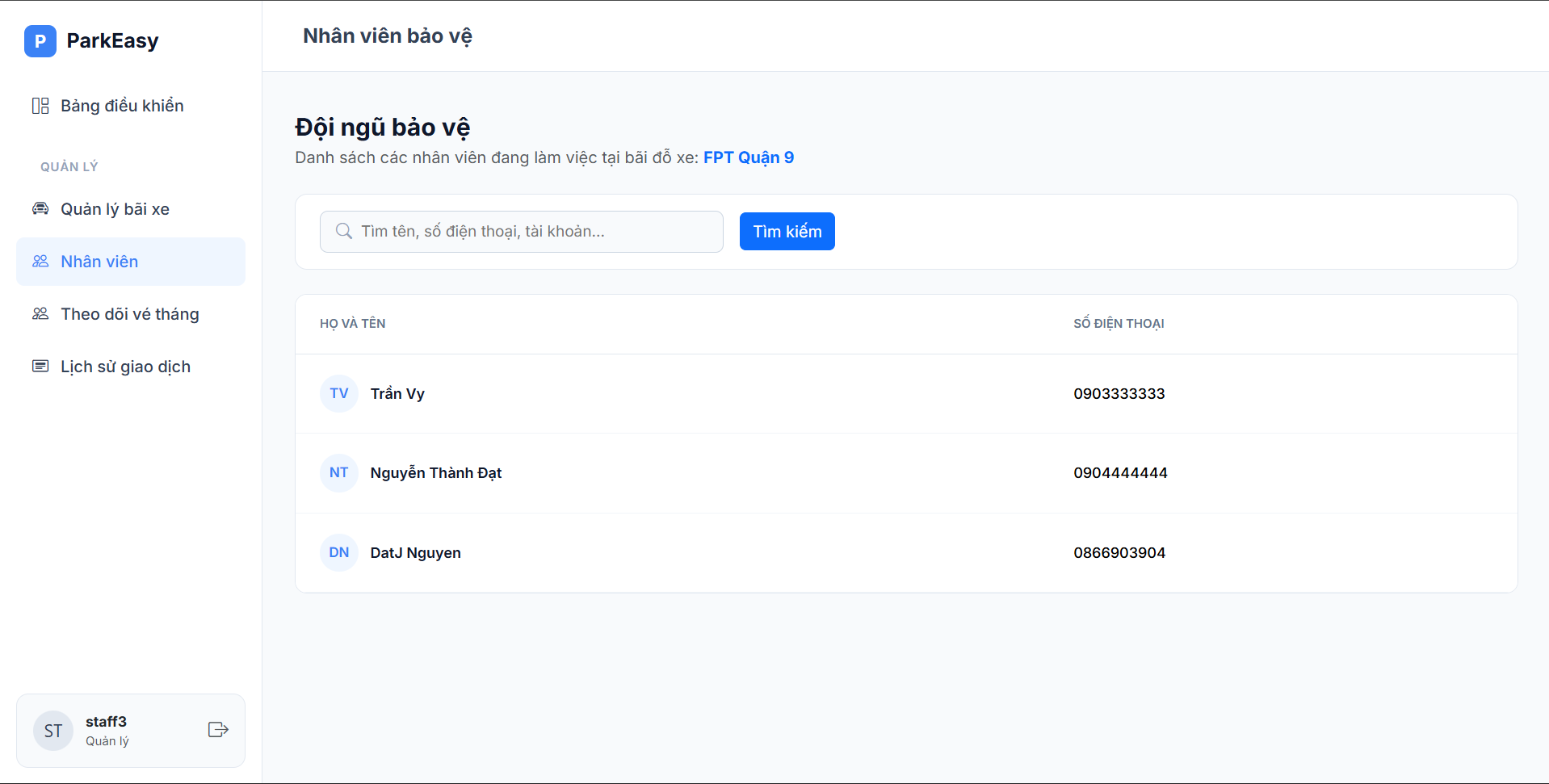
Figure 15. Employee List interface
| Field Name | Field Type | Description |
|---|---|---|
| siteName | String | The name of the site where the employees work. |
| param.search | String | Search keyword entered by the manager (name, phone, etc.). |
| listEmployees | List<Employee> | Collection of employee records working at the site. |
| emp.firstName | String | The first name of the employee. |
| emp.lastName | String | The last name of the employee. |
| emp.phone | String | The contact phone number of the employee. |
2.3.4. Subscription
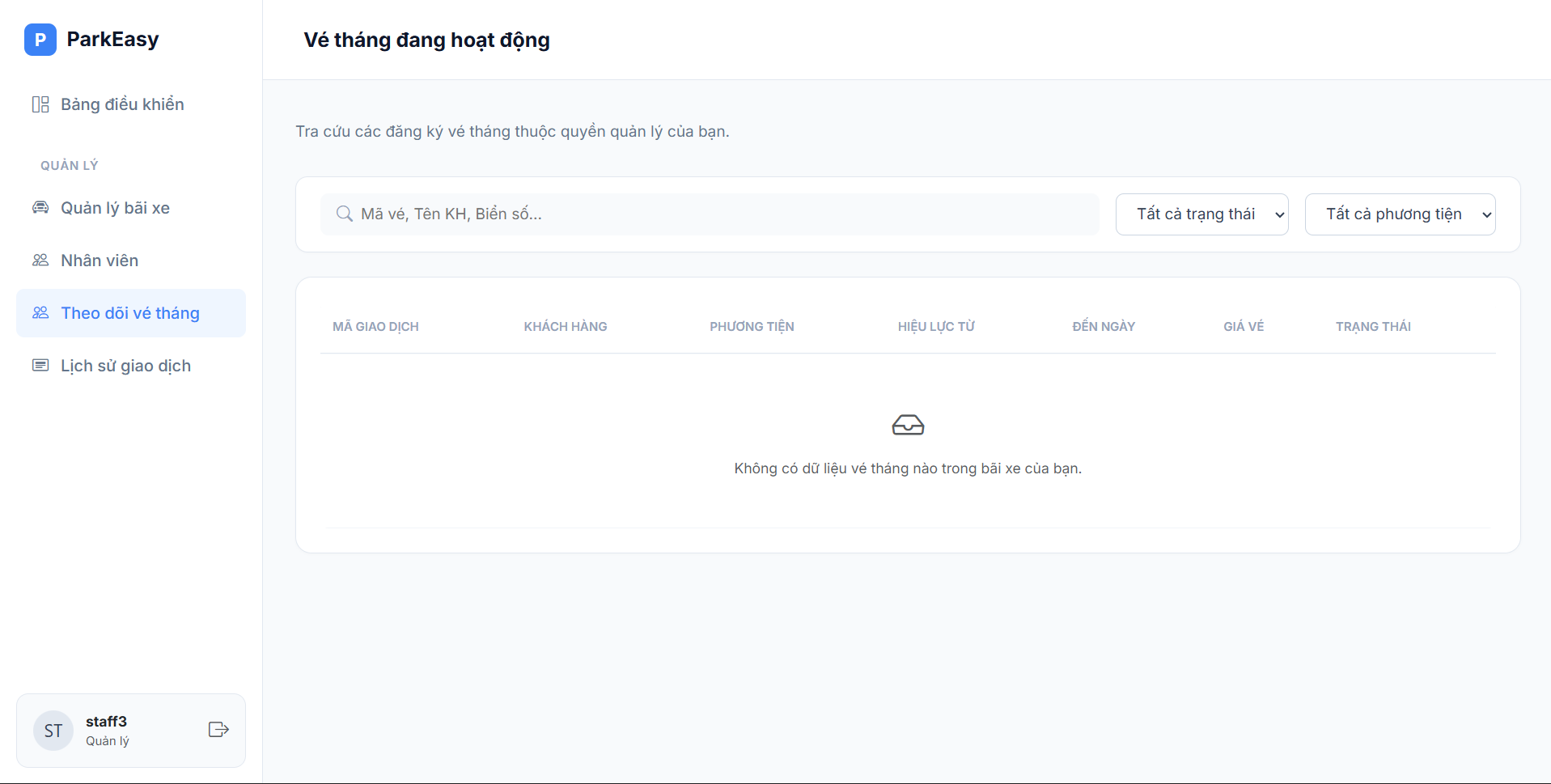
Figure 16. Subscription Management interface
| Field Name | Field Type | Description |
|---|---|---|
| param.search | String | Search keyword (transaction code, customer name, license plate). |
| param.status | String | Filter parameter for subscription status. |
| param.type | String | Filter parameter for vehicle type. |
| listTransactions | List<Object> | Collection of subscription transaction records. |
| tx.transactionCode | String | Unique code identifying the subscription transaction. |
| tx.customerName | String | Full name of the subscribed customer. |
| tx.avatarInitials | String | Initials extracted from customer's name for avatar display. |
| tx.licensePlate | String | License plate number of the registered vehicle. |
| tx.vehicleType | String | Type of vehicle (e.g., car, motorbike). |
| tx.startDate | Date | The start date of the subscription validity. |
| tx.endDate | Date | The expiration date of the subscription validity. |
| tx.totalAmount | Long | Total monetary amount paid for the subscription. |
| tx.status | String | Current status of the subscription (completed, accepted, failed). |
2.3.5. Transaction History
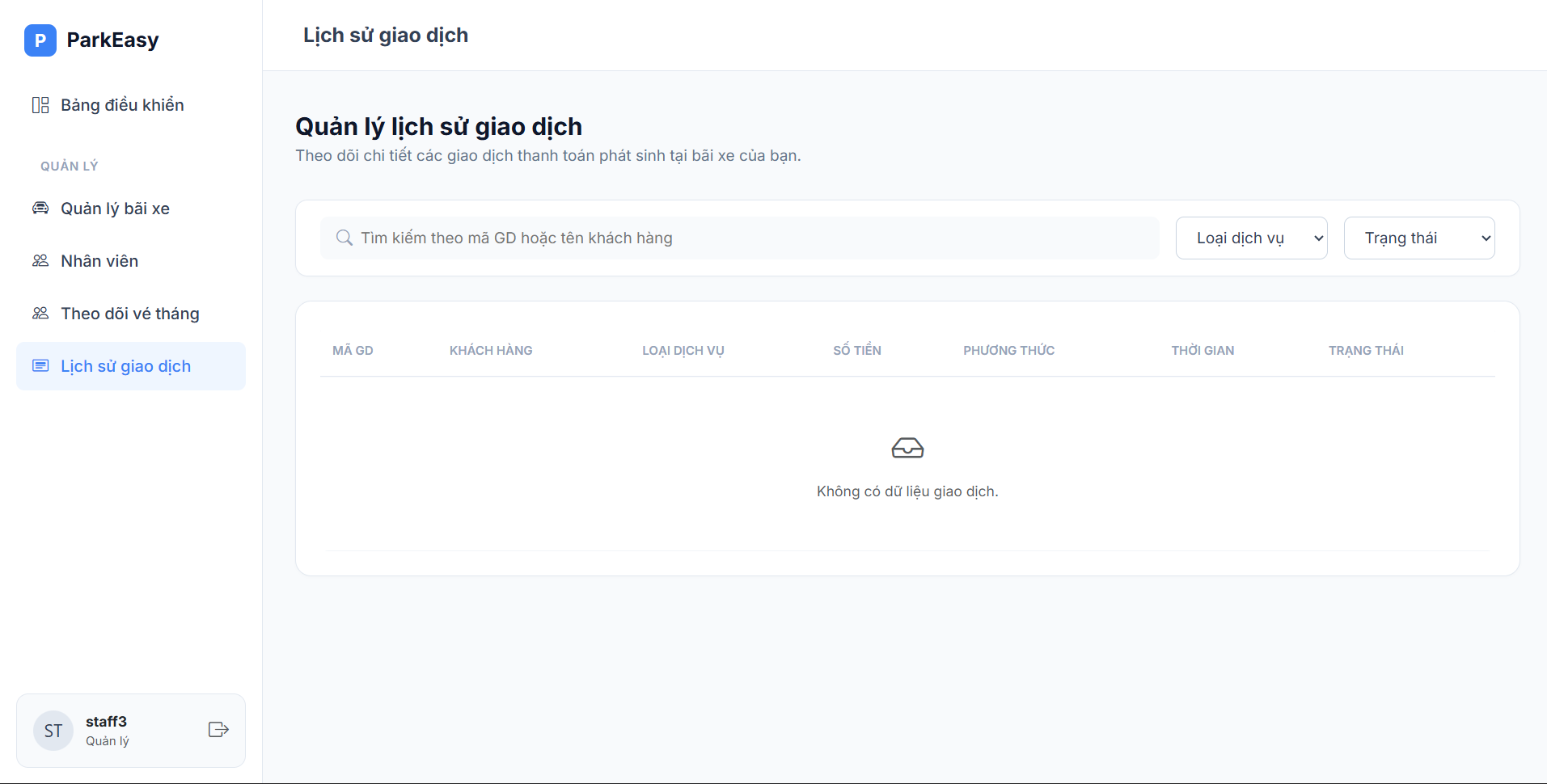
Figure 17. Transaction History interface
| Field Name | Field Type | Description |
|---|---|---|
| param.search | String | Search keyword (transaction code or customer name). |
| param.serviceType | String | Filter parameter for the type of service (casual vs subscription). |
| param.status | String | Filter parameter for transaction status. |
| listTransactions | List<Object> | Collection of payment transaction records. |
| tx.transactionCode | String | Unique transaction identifier. |
| tx.avatarInitials | String | Initials extracted from customer's name for avatar display. |
| tx.customerName | String | Name of the customer who made the payment. |
| tx.serviceType | String | The type of parking service purchased. |
| tx.amount | Long | Total amount of the transaction. |
| tx.paymentMethod | String | The method used for payment (e.g., cash, banking). |
| tx.paymentTime | Date / Timestamp | The exact date and time the payment occurred. |
| tx.status | String | Status of the transaction (completed, accepted, failed). |
2.4. Admin
2.4.1. Admin Dashboard
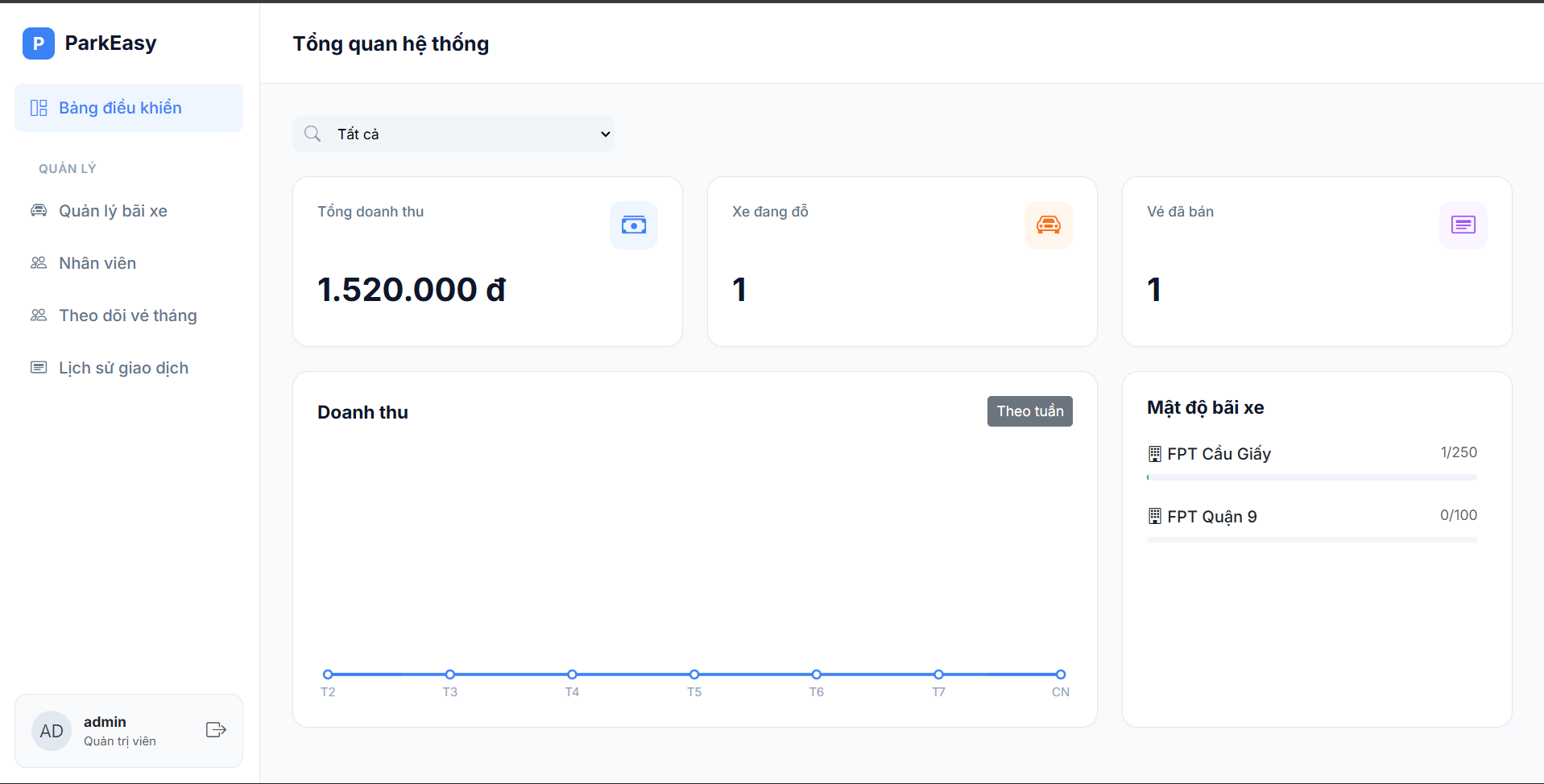
Figure 18. Admin Dashboard interface
| Field Name | Field Type | Description |
|---|---|---|
| siteId | Dropdown (Select) | Used to filter chart and statistical data by "All" or a specific active parking site. |
2.4.2. List Sites
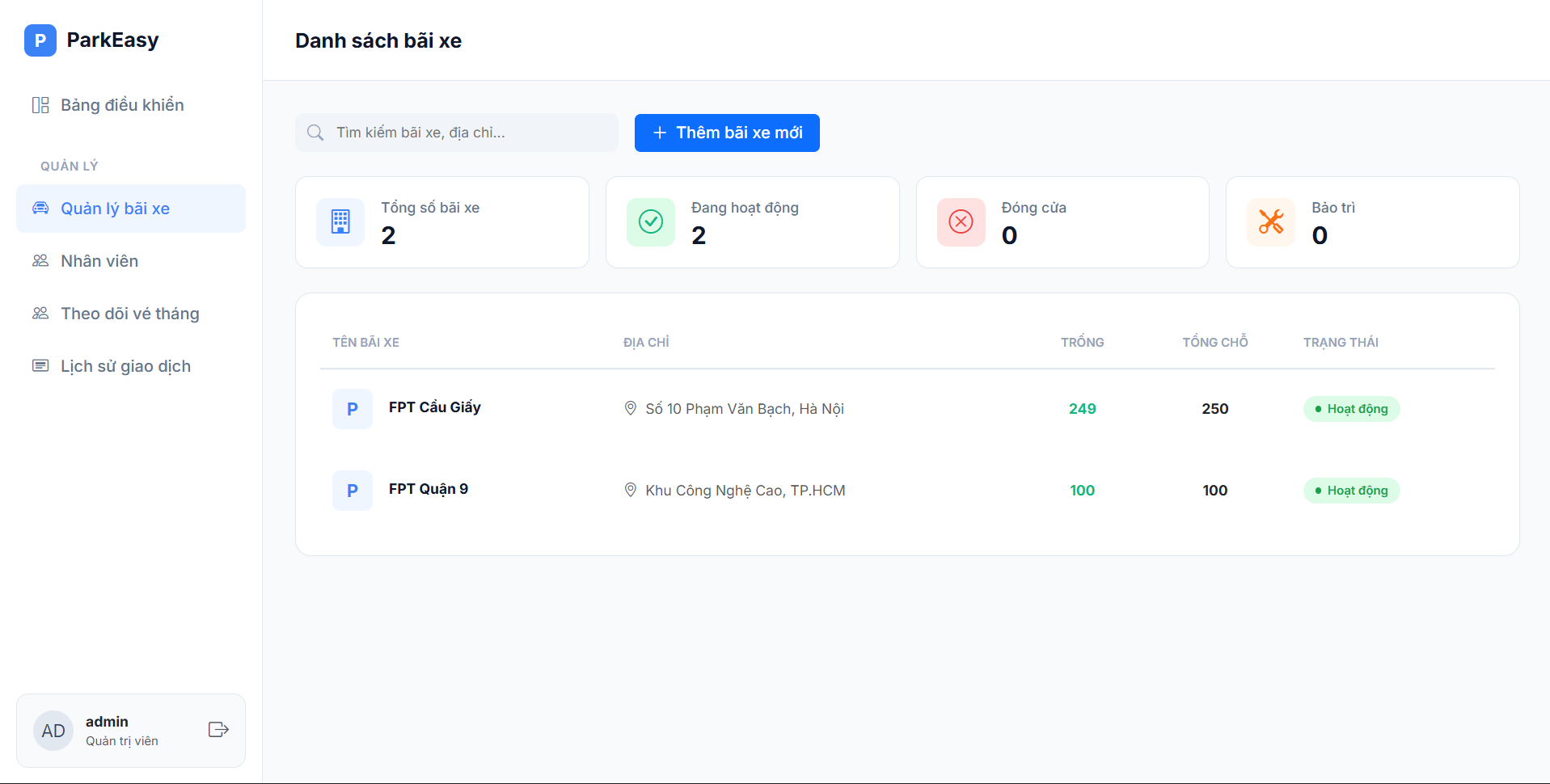
Figure 19. Parking Site List interface
| Field Name | Field Type | Description |
|---|---|---|
| siteSearchQuery | Text Input | Search box for parking sites based on the site name or physical address. |
2.4.3. Add Site
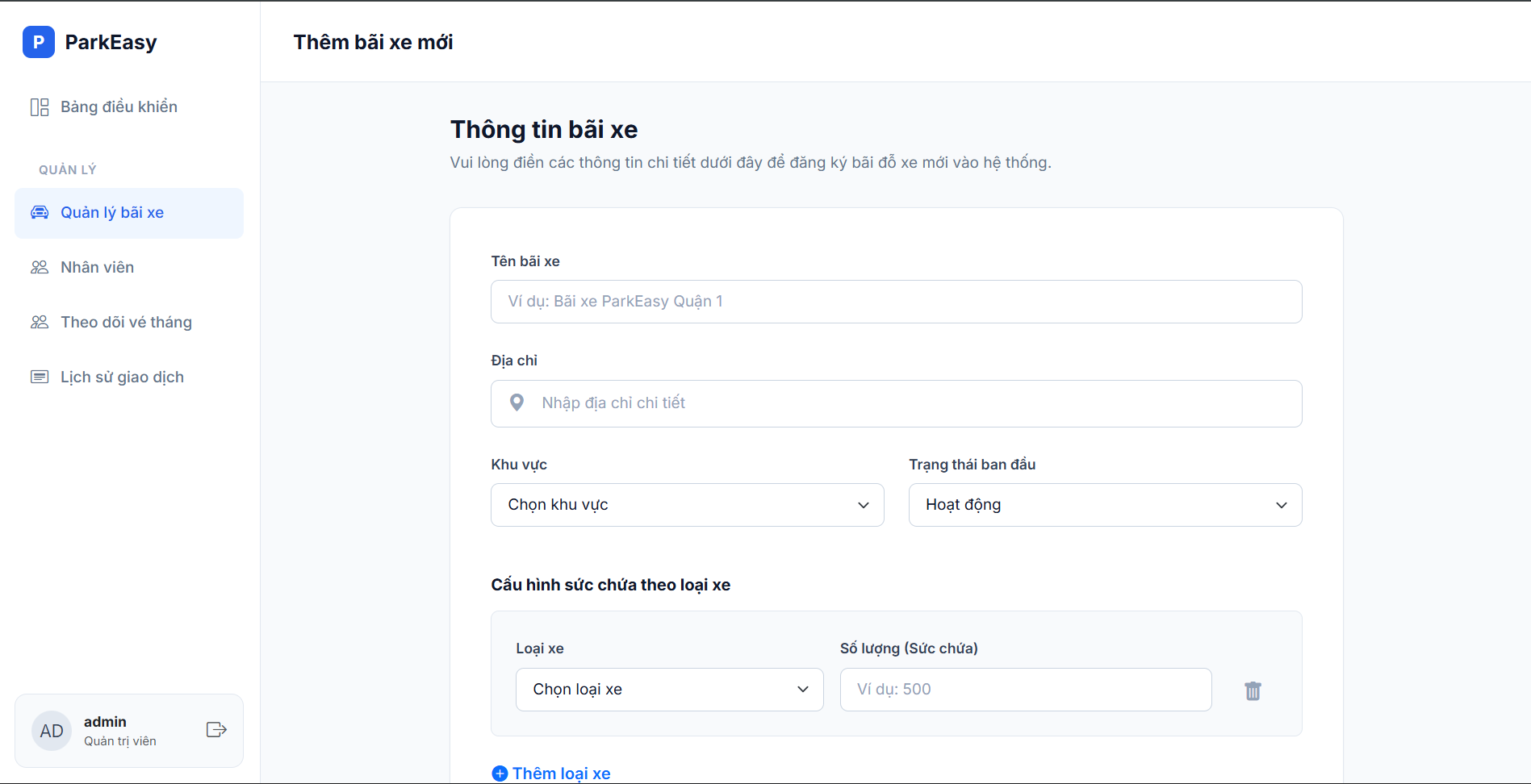
Figure 20. Add New Parking Site interface
| Field Name | Field Type | Description |
|---|---|---|
| siteName | Text Input (Required) | The name of the parking site (e.g., ParkEasy District 1). |
| siteAddress | Text Input (Required) | The detailed physical address of the parking facility. |
| siteRegion | Dropdown (Select) | The geographical region of the site (e.g., North, Middle, South). |
| siteState | Dropdown (Select) | The initial operational status when creating the site (Operating, Maintenance, Closed). |
| vehicleType | Dropdown (Array) | Selection of supported vehicle types in the site (Car, Motorbike, etc.). |
| capacity | Number Input (Array) | The maximum quantity/capacity (Slots) for the corresponding vehicle type. |
| hourlyPrice | Text Input (Array) | Sets the hourly parking fee (VND). |
| monthlyPrice | Text Input (Array) | Sets the monthly subscription fee (VND). |
2.4.4. Site Detail, Update, Price Config, Delete Site
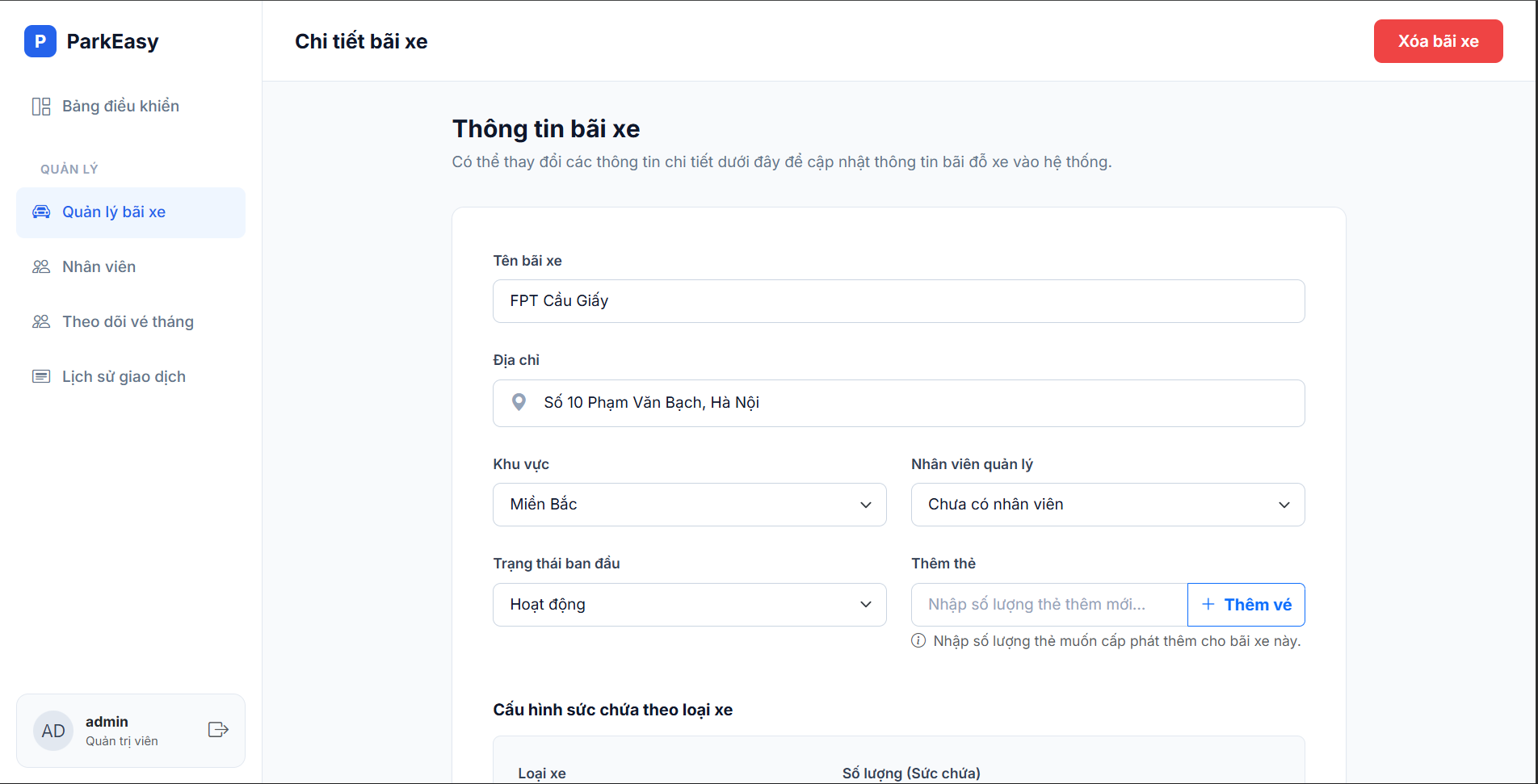
Figure 21.1 Update and Configure Parking Site interface
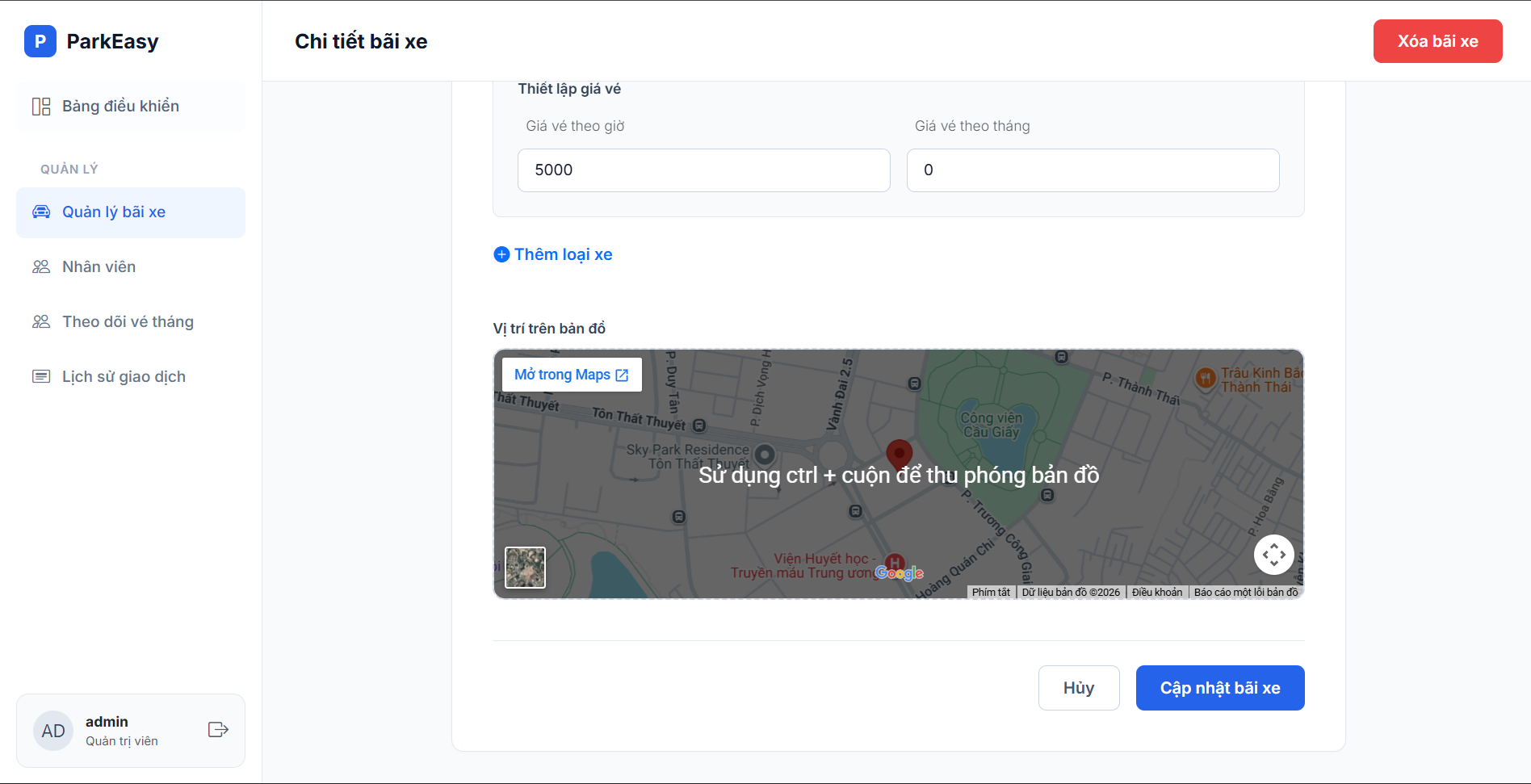
Figure 21.2 Update and Configure Parking Site interface
| Field Name | Field Type | Description |
|---|---|---|
| siteName | Text Input | Updates the name of the parking site. |
| siteAddress | Text Input | Updates the detailed address of the parking site. |
| siteRegion | Dropdown (Select) | Updates the affiliated geographical region. |
| siteManager | Dropdown (Select) | Assigns a specific employee to manage this site directly. |
| siteState | Dropdown (Select) | Updates the operational status of the site. |
| cardQuantity | Number Input | Enter the number of physical parking cards to be additionally issued for this site. |
| siteId (Hidden) | Hidden Input | The identification ID of the parking site (used behind the scenes for adding cards or deleting the site). |
| vehicleType | Dropdown (Array) | List of vehicle types to configure or update. |
| capacity | Number Input (Array) | Updates the maximum capacity for the specified vehicle type. |
| hourlyPrice | Text Input (Array) | Updates the hourly parking price. |
| monthlyPrice | Text Input (Array) | Updates the monthly subscription price. |
2.4.5. List Employees
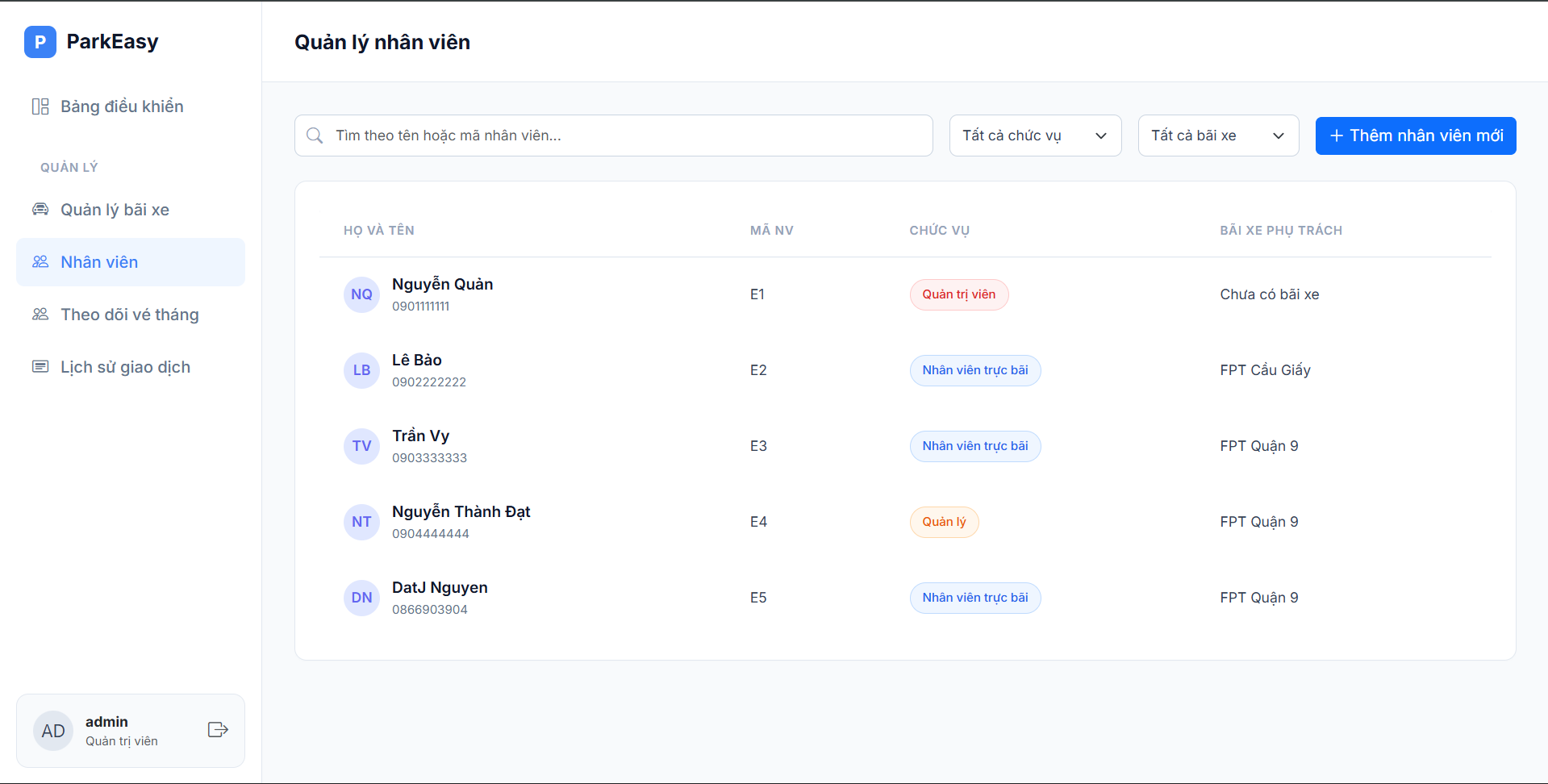
Figure 22. Employee Management interface
| Field Name | Field Type | Description |
|---|---|---|
| employeeSearch | Text Input | Search box by employee name or identification code. |
| roleFilter | Dropdown (Select) | Filters the employee list by role (All, Admin, Manager, Staff). |
2.4.6. Add Employee
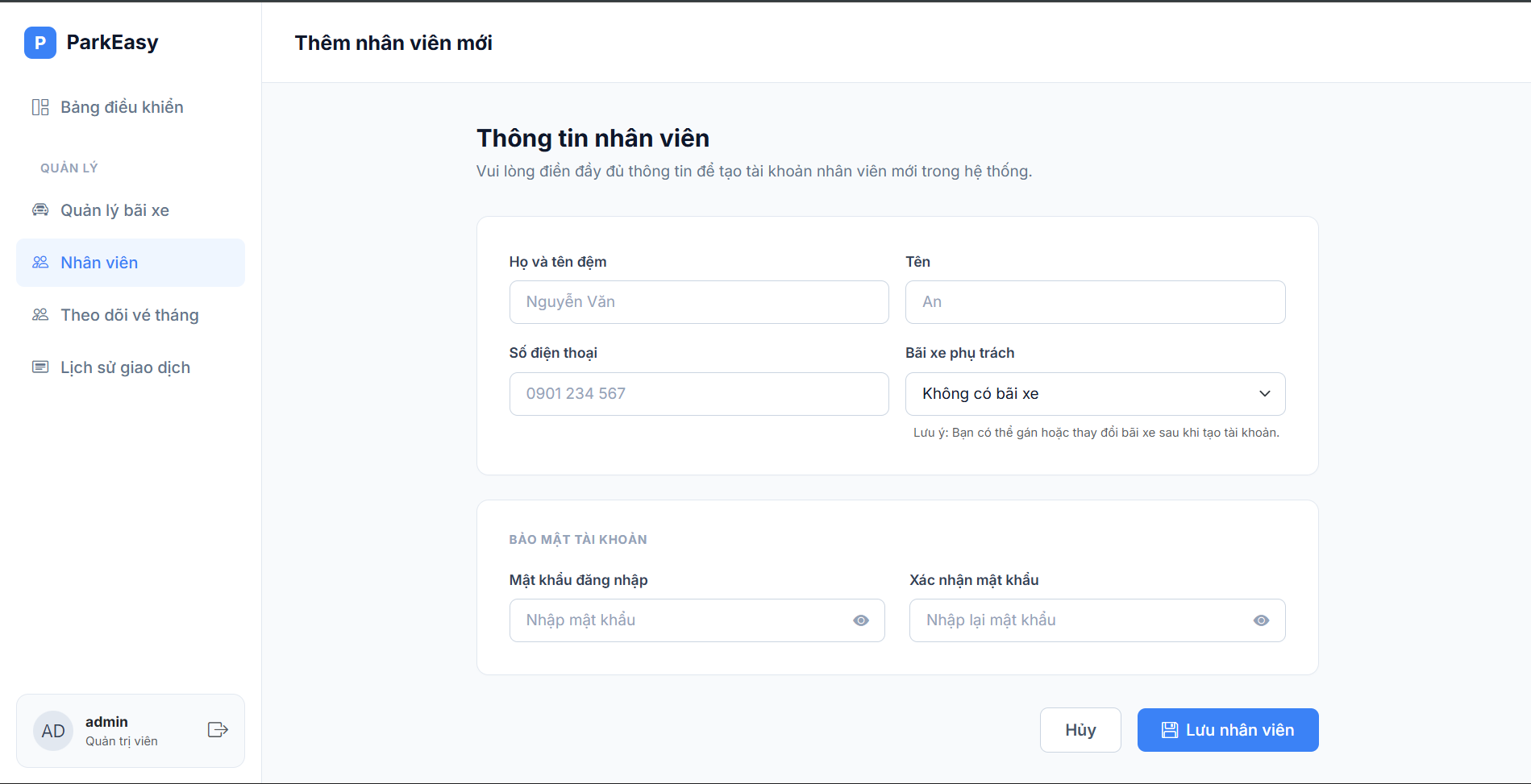
Figure 23. Add New Employee interface
| Field Name | Field Type | Description |
|---|---|---|
| lastName | Text Input (Required) | The last name and middle name of the employee. |
| firstName | Text Input (Required) | The first name of the employee. |
| phone | Tel Input (Required) | The phone number used for contact and as the login account. |
| siteId | Dropdown (Select) | Selects the specific parking site the employee is assigned to work at (or "No site"). |
| password | Password (Required) | The password to access the system. |
| confirmPassword | Password (Required) | Re-enter the password for verification. |
2.4.7. Update, Delete Employee
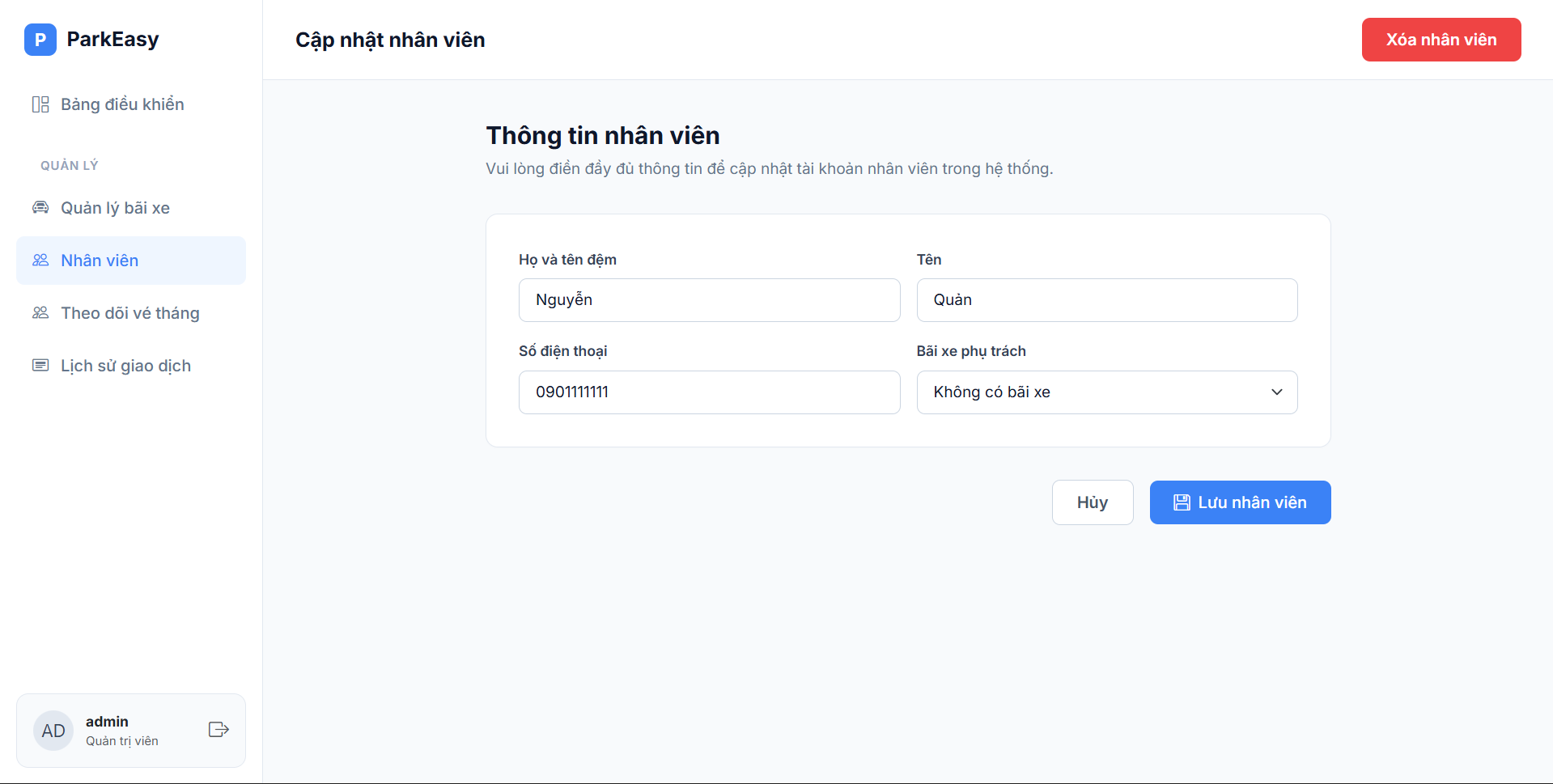
Figure 24. Update/Delete Employee interface
| Field Name | Field Type | Description |
|---|---|---|
| employeeId (Hidden) | Hidden Input | The identification ID of the employee (not displayed on the UI, used when submitting the update form or deleting the account). |
| lastName | Text Input (Required) | Updates the last name and middle name. |
| firstName | Text Input (Required) | Updates the first name. |
| phone | Tel Input (Required) | Updates the contact phone number. |
| siteId | Dropdown (Select) | Transfers this employee to manage or work at another parking site. |
2.4.8. Subscription
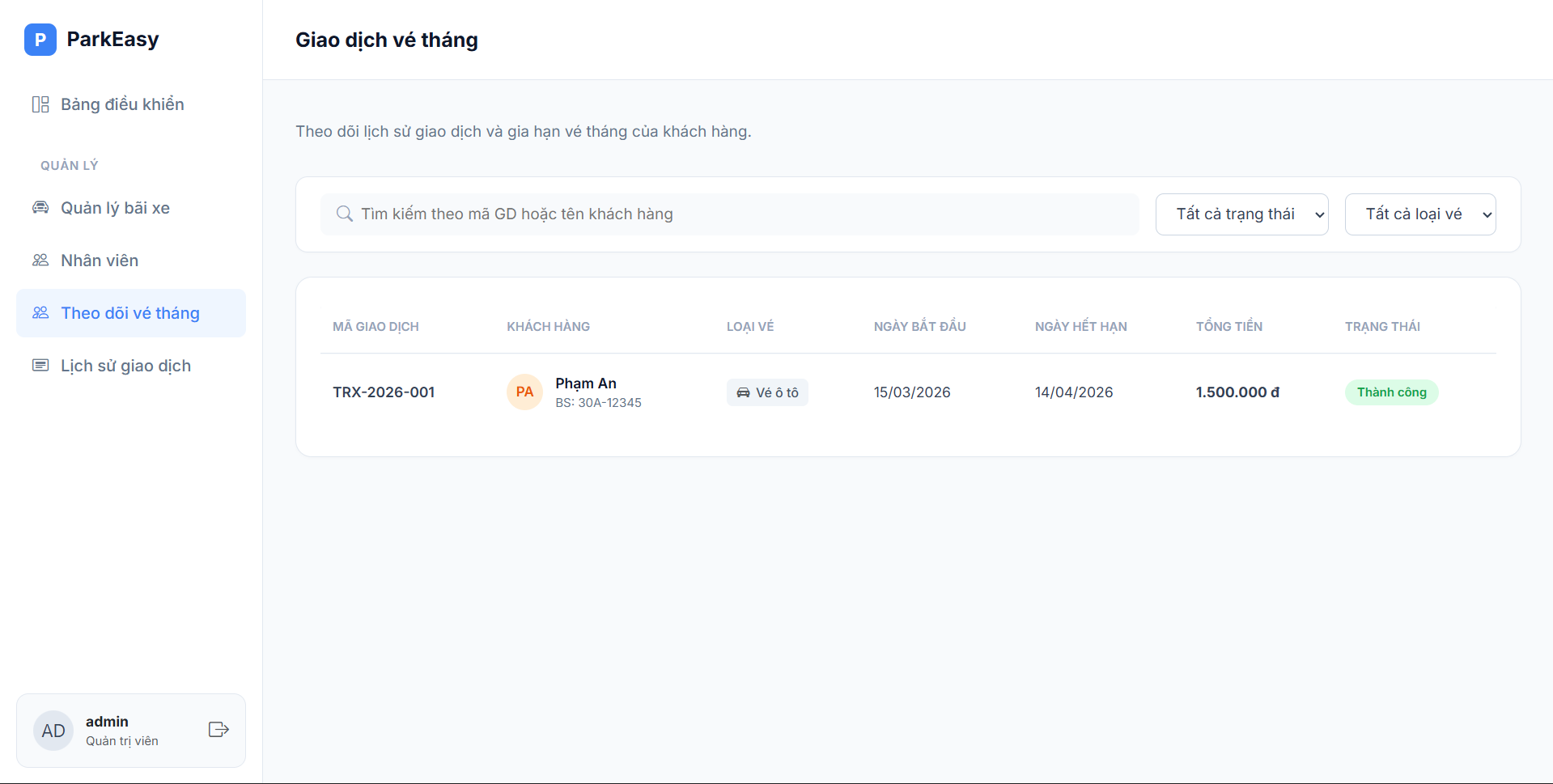
Figure 25. System-wide Subscription Management interface
| Field Name | Field Type | Description |
|---|---|---|
| searchQuery | Text Input | Search box to find subscriptions by license plate, customer name, or phone number. |
| siteFilter | Dropdown (Select) | Filters the subscription list by a specific parking site. |
| statusFilter | Dropdown (Select) | Filters subscriptions by their current status (e.g., Active, Expired, Pending). |
| vehicleTypeFilter | Dropdown (Select) | Filters the list by vehicle type (Car, Motorbike). |
2.4.9. Transaction History
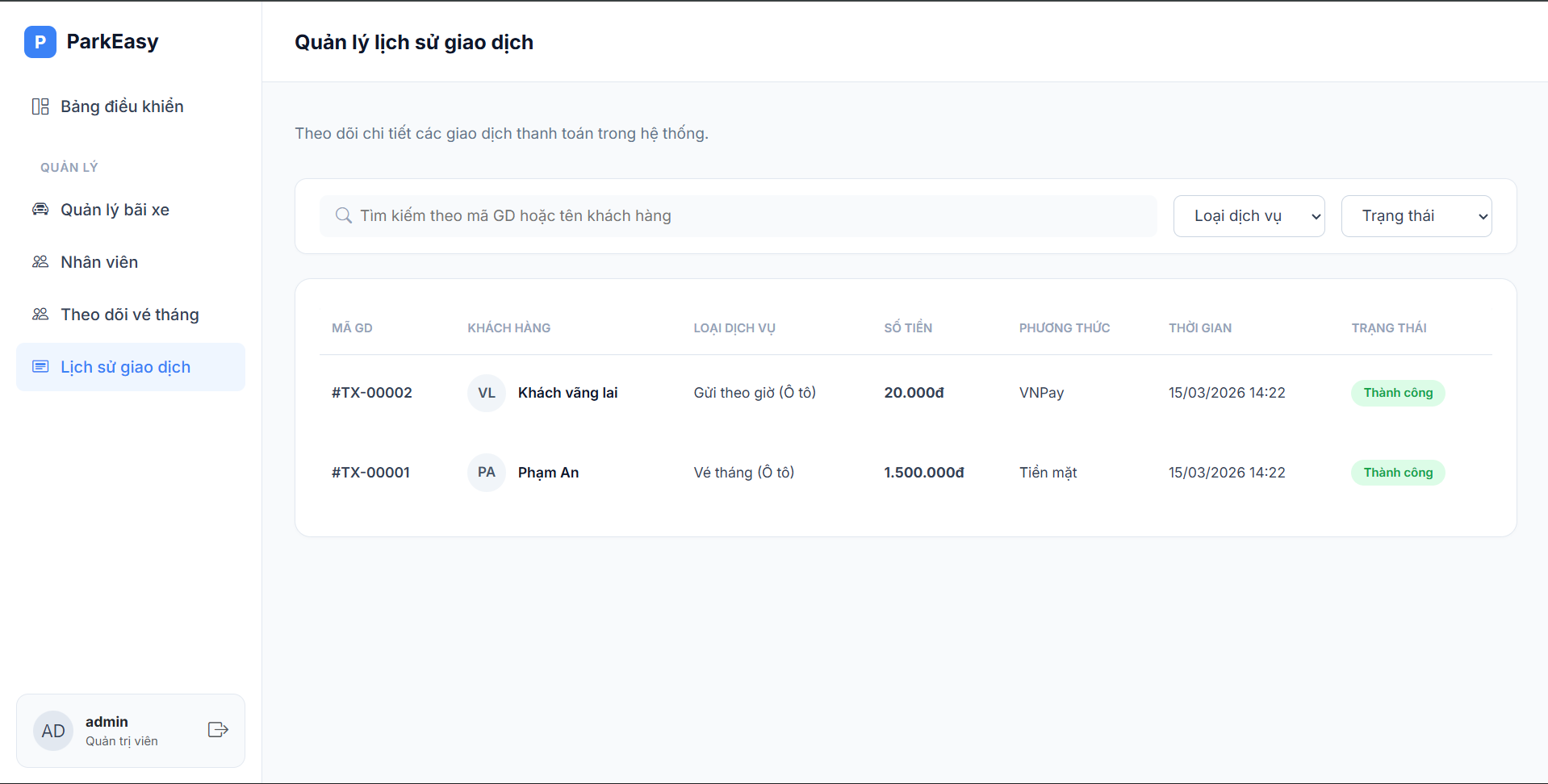
Figure 26. System-wide Transaction History interface
| Field Name | Field Type | Description |
|---|---|---|
| transactionSearch | Text Input | Search box to lookup specific transactions using Transaction ID or Customer Phone. |
| dateRangeFilter | Date Range Picker | Filters the transaction list within a specific start date and end date. |
| transactionType | Dropdown (Select) | Filters records by payment type (Wallet Top-up, Subscription Purchase, Booking Deposit, Casual Parking Fee). |
| paymentStatus | Dropdown (Select) | Filters the transactions by their completion status (Success, Failed, Pending). |
| siteFilter | Dropdown (Select) | Filters transactions that occurred at a specific parking site (useful for revenue allocation). |
III. Students Contribution
| Student Number | Full Name | Works | Percentage |
|---|---|---|---|
| HE200115 | Nguyễn Thành Đạt | Code Admin, Manager business logic | 34% |
| HE201167 | Nguyễn Minh Hiếu | Code Customer business logic | 33% |
| HE200247 | Nguyễn Nhật Minh | Code Staff business logic | 33% |
IV. Appendix
4.1. Assumptions & Dependencies
- AS-1: The operational system for Staff and Admin/Manager will be used within the organization's internal network for security, while Customers can access the booking system via the Internet.
- DE-1: Users have basic knowledge of using standard web browsers.
4.2. Limitations & Exclusions
- L-E: The system will not natively support mobile platforms (no dedicated mobile app) in the current version.
4.3. Business Rules
- BR-1: Default admin account: MemberID is "admin" and password is "admin".
- BR-2: Default manager account: MemberID is "staff3" and password is "123".
- BR-3: Default staff account: MemberID is "staff2" and password is "123".
- BR-4: Default customer account: MemberID is "customer1" and password is "123".